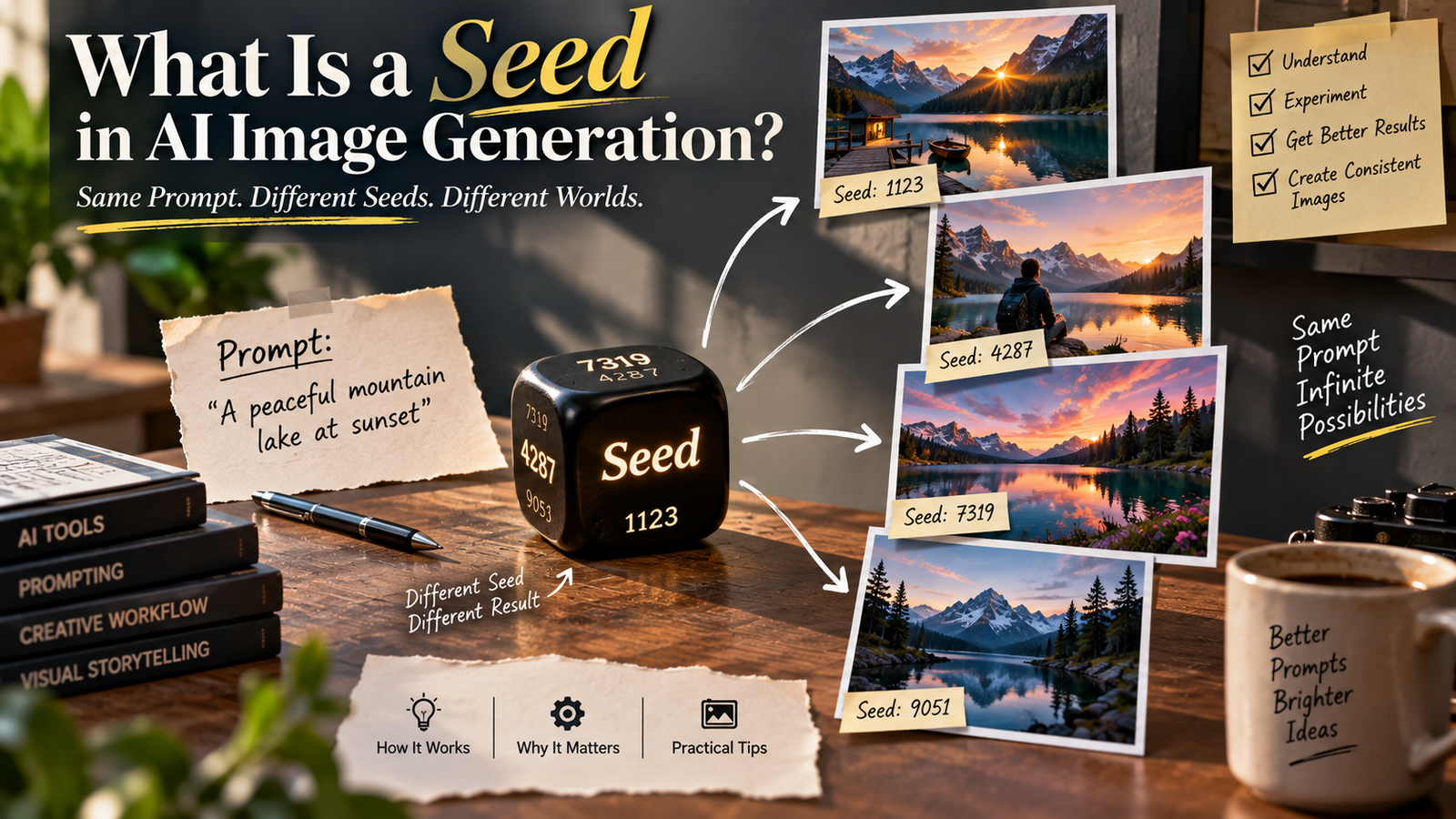
Have you ever used almost the same instruction twice and wondered why the AI produced a completely different image?
The person may have a different pose. The background may change. Lighting can look different. Even small details such as clothing folds, hair and facial features may not stay the same.
At first, it can feel like the AI simply ignored your instruction.
But there is another part of image generation that plays an important role: the seed.
You may have seen a “seed” option in an AI image generator or editing tool without knowing what it actually does.
A seed isn’t a magic code for creating a particular image, and it isn’t the same thing as a prompt. It is better understood as a starting point used by a generative process.
Once you understand what a seed is in AI image generation, it becomes much easier to understand why two generations can differ and why some workflows are easier to reproduce than others.
What Is a Seed in AI Image Generation?
In simple terms, a seed is a numerical starting point used by a generative system when creating an image.
Generative image systems often involve randomness.
Instead of following exactly one fixed path from your prompt to the final image, the system can begin from different starting conditions and produce different results.
The seed helps determine that starting point.
You can think of it like starting the same journey from a different position.
The destination may be described by the same instructions, but the route can change.
In image generation, changing the seed can result in a different visual interpretation of the same prompt.
Why Does AI Need Randomness?
This is one of the most useful things to understand.
Imagine you write:
Create a realistic portrait of a person standing beside a lake at sunset.
There isn’t only one correct image that satisfies that description.
The person could be:
- Standing closer to the camera
- Standing farther away
- Looking left
- Looking toward the camera
- Wearing different clothing
- Positioned differently in the frame
The lake could look different.
The clouds could change.
The lighting could vary.
There are countless images that could satisfy the same instruction.
Randomness gives the model room to explore those possibilities.
Without some variation, generative image creation would be much more repetitive.
The Same Prompt Can Produce Different Images
This is why you can enter the same prompt multiple times and receive different results.
For example:
Prompt:
A realistic street photograph of a person walking through a rainy city at night.
One generation might show:
- Neon signs
- Wet pavement
- A person with an umbrella
- A wide camera angle
Another might show:
- Narrow streets
- Reflections
- A person without an umbrella
- A closer camera position
Both can still follow the same general instruction.
The difference isn’t necessarily because one prompt was “better.”
The generation process can begin differently.
The seed is one of the mechanisms associated with that variation.
Seed and Prompt Are Not the Same Thing
This distinction is important.
A prompt describes what you want.
A seed helps determine the starting conditions of the generation.
For example:
Prompt:
A cinematic portrait beside an old brick wall.
Seed:
A numerical value such as 12345.
The number doesn’t describe the brick wall.
It doesn’t mean “cinematic portrait.”
It isn’t a secret vocabulary for the AI.
It is simply a parameter that can influence which variation the generative process produces.
What Happens When You Change the Seed?
If your image tool allows you to control the seed, changing it can produce a different result while keeping other settings similar.
You may see changes in:
- Composition
- Pose
- Lighting
- Background details
- Clothing
- Facial characteristics
- Object placement
- Texture
The amount of change depends on the model and the other generation settings.
This is why creators sometimes try several seeds when searching for a composition they like.
Instead of rewriting the entire prompt, they can explore different variations.
What Happens When You Keep the Same Seed?
This is where seeds become particularly useful.
In systems that support reproducible seeds, keeping the same seed along with the same relevant settings can help reproduce or closely reproduce a previous generation.
But there is an important qualification:
The same seed does not guarantee the same image across every AI tool or every situation.
The result can depend on:
- Model version
- Prompt
- Image input
- Settings
- Sampler or generation method
- Resolution
- Software implementation
- Other parameters
If the underlying system changes, the same number may no longer produce the same result.
Why “Same Seed” Doesn’t Mean “Same Image Everywhere”
Imagine you use the seed 12345 in one AI model.
Then you enter 12345 into another model.
You shouldn’t expect the same image.
A seed only has meaning within the generation system that uses it.
It’s similar to using the same starting number in two completely different mathematical processes.
The number is the same.
The process isn’t.
Therefore, the result doesn’t have to be the same.
Seeds Are More Useful Inside the Same Workflow
If you’re experimenting with one particular image model, a seed can become a useful reference.
For example, suppose you find a generation with an excellent composition.
You record:
- Prompt
- Seed
- Model
- Resolution
- Important settings
Later, you can attempt variations while keeping as much of the original setup as possible.
This can make experimentation more organized.
Without those details, it can be difficult to understand why your previous result looked so different.
A Seed Is Not a Saved Image
This is another common misunderstanding.
A seed doesn’t contain the complete image.
If someone gives you a seed number, that doesn’t mean you can automatically recreate their exact photograph.
You would generally need the relevant generation environment and settings as well.
Think of a seed as a starting reference, not an image file.
The actual image comes from the complete generation process.
A Seed Doesn’t Store the Person in Your Image
Suppose you generate a portrait and receive a person you really like.
You might think:
“I’ll save this seed so I can use the exact same person later.”
Unfortunately, that’s not a universal guarantee.
The seed isn’t a digital identity card for the person.
It doesn’t necessarily contain the person’s facial identity as a reusable asset.
Even if the same seed produces a similar composition in the same system, changing the prompt or other conditions can alter the result significantly.
If identity consistency is important, you generally need a workflow designed specifically for maintaining subject identity.
Why Seed Alone Can’t Guarantee Character Consistency
Imagine you create:
A young man standing on a beach at sunset.
You like the result.
Then you keep the seed but change the prompt to:
The same young man sitting inside a modern café.
The result may not preserve the exact person.
The model has to interpret a new scene.
It may change:
- Face
- Hair
- Clothing
- Body proportions
The seed can influence the generation, but it isn’t necessarily a mechanism for locking the character’s identity.
Seed vs Reference Image
These are also different tools.
A seed influences the generation process.
A reference image provides visual information that the model can use as guidance.
If you want to maintain a particular person’s appearance, a reference-image workflow may be more relevant than relying on a seed alone.
For example, you might instruct an editing system to preserve the original subject while changing the environment.
That gives the model actual visual information about the person rather than relying entirely on a numerical starting point.
Seed vs Prompt vs Reference Image
A simple comparison helps:
| Element | Main purpose |
|---|---|
| Prompt | Describes the desired result |
| Seed | Influences the generation’s starting variation |
| Reference image | Provides visual information to guide the result |
| Model | Determines how the system interprets everything |
| Settings | Control other aspects of the generation |
These components can work together.
None of them should be treated as a replacement for the others.
Why Seeds Matter More for Some Creators
A casual user may never need to see a seed.
You can generate an image, choose the version you like and move on.
But seeds become more useful when you’re doing repeated experiments.
For example:
- Testing different compositions
- Creating variations
- Comparing prompt changes
- Rebuilding a previous concept
- Developing a visual series
- Troubleshooting generation differences
If you’re creating one image once, the seed may not matter much.
If you’re creating dozens of related images, it becomes more interesting.
Using Seeds to Compare Prompt Changes
Here’s a useful experiment.
Imagine your image tool lets you lock the seed.
Start with:
A realistic portrait in a modern studio.
Generate an image.
Then change only one part:
A realistic portrait in a modern studio with soft window light.
If the rest of the generation setup stays consistent, you can compare how that prompt change affects the output.
This can help you learn what your AI model responds to.
Instead of changing five things at once, you can change one variable.
That is a much more useful way to experiment.
Think Like an Experimenter
This is where AI image generation starts becoming a real skill.
Instead of:
Try random prompts until something looks good.
Try:
Change one variable.
Observe the result.
Then change another variable.
For example:
Experiment 1: Same prompt, different seed.
Experiment 2: Same seed, slightly different prompt.
Experiment 3: Same prompt and seed, different resolution.
Experiment 4: Same setup, different reference image.
This helps you understand what is actually affecting your result.
Why Seeds Can Help With Troubleshooting
Suppose you suddenly get a completely different result.
You can ask:
- Did the prompt change?
- Did the model change?
- Did the seed change?
- Did the reference image change?
- Did the resolution change?
- Did another setting change?
Without keeping track of your generation setup, troubleshooting becomes guesswork.
With a recorded seed and settings, you have more information to work with.
But Don’t Obsess Over the Seed
There’s a danger here too.
Some creators spend too much time searching for a “perfect seed.”
That can distract from the things that matter more.
A seed can’t fix:
- A vague prompt
- A poor reference image
- An impossible composition
- Conflicting instructions
- An unsuitable model
If the basic instruction is wrong, changing the seed won’t magically solve the underlying problem.
Prompt Quality Still Matters
Imagine your prompt says:
Make a good photo.
You try twenty different seeds.
You may get twenty different interpretations of a vague instruction.
Now imagine you clearly describe:
- Subject
- Environment
- Lighting
- Composition
- Mood
- Important preservation requirements
The model has much more useful information.
Seeds can help you explore variations of a good idea.
They don’t replace the idea.
Seeds and AI Photo Editing
The role of a seed can become less obvious when you’re editing an existing photograph.
If you upload a photograph and ask AI to make a small change, the tool may use the source image as a major part of the editing process.
Depending on the system, seed controls may be hidden or unavailable.
That’s normal.
Many consumer AI editors intentionally simplify the interface.
You don’t need to understand every internal parameter to make a good edit.
But knowing what seeds are helps explain why some advanced tools expose them.
Why Some AI Tools Don’t Show Seed Values
AI applications are designed for different audiences.
A professional or advanced image-generation interface might expose:
- Seed
- Sampling settings
- Guidance controls
- Model selection
- Resolution
- Steps
A consumer application may hide most of these.
Instead, it might offer:
Generate
Regenerate
Edit
Create variation
The underlying system can still involve randomness even when you can’t see the seed.
So the absence of a seed field doesn’t mean that the system isn’t using a random generation process.
“Random Seed” Usually Means the Tool Chooses It for You
Some systems allow you to enter a specific seed.
Others use a random seed automatically.
That’s why you can generate an image twice with exactly the same prompt and receive different outputs.
The tool may simply be choosing a different starting value each time.
This is convenient for casual users because it gives you variations automatically.
Advanced users may prefer manual seed control when reproducibility matters.
Can a Seed Make Images More Consistent?
It can help with reproducibility within a compatible workflow.
But don’t confuse reproducibility with complete consistency.
A seed may help you recreate a similar generation setup.
It doesn’t automatically lock:
- Identity
- Clothing
- Background
- Pose
- Lighting
- Composition
If you change other parts of the workflow, the result can change.
So a seed is one part of consistency—not a complete consistency system.
Why Model Updates Can Break Old Results
This is something creators sometimes discover unexpectedly.
You generate an image today.
You record the prompt and seed.
Months later, the AI platform updates the model.
You use the same prompt and seed.
The result looks different.
That’s possible because the model itself has changed.
The seed operates within the model’s generation process.
Change the process, and the same seed doesn’t necessarily lead to the same outcome.
This is why saving the actual image is more important than saving the seed alone.
Save the Image, Not Just the Settings
If you create something valuable, keep the actual output.
Also save useful information such as:
- Prompt
- Seed, if available
- Model
- Date
- Resolution
- Reference image
- Important settings
This creates a simple record of your experiment.
If you need to recreate the result later, you have much more information available.
A Practical Example
Suppose you’re building a series of AI-generated travel images.
You create the first image:
A realistic photograph of a mountain road during golden hour.
You like the composition.
Instead of immediately changing everything, record the setup.
Then experiment with:
Same concept, different seed.
You may discover another composition you prefer.
Next, keep the preferred seed and adjust the prompt to describe a specific camera angle.
Now you can compare the results.
This is far more controlled than generating random images without keeping track of what changed.
Seeds and Variations
Some AI tools provide a “variation” or “remix” function rather than exposing a seed.
The underlying idea can still involve creating a related generation from an existing result.
The important difference is that the tool handles the technical parameters for you.
For beginners, this can actually be easier.
You don’t necessarily need to know the seed value to explore variations.
When Should You Care About Seeds?
You should probably learn about seeds if you’re:
- Testing AI models
- Comparing prompt changes
- Creating image variations
- Building a consistent visual series
- Reproducing experiments
- Troubleshooting unexpected changes
- Using an advanced image-generation platform
You probably don’t need to worry about them if you’re simply making a quick social-media image and choosing the best result.
When a Seed Is Not the Solution
If your problem is that AI keeps changing a person’s face, don’t immediately search for a better seed.
The issue may be identity preservation.
If the background doesn’t match the subject, the problem may be perspective or lighting.
If text is wrong, changing the seed may produce another wrong version.
If hands are distorted, you may need a better pose or a different editing strategy.
Understanding the actual problem is more valuable than changing parameters randomly.
A Better Way to Work With AI Generators
If your tool exposes seeds, try this simple workflow.
Start with your main idea
Write a clear prompt.
Generate several variations
Don’t judge the first result immediately.
Find the strongest composition
Look for the version that already has the structure you want.
Record the useful settings
Save the seed if available.
Change one thing at a time
Don’t rewrite everything simultaneously.
Compare results
See which change actually helped.
Save the final image
Don’t rely on the seed as your only backup.
This turns AI generation into a repeatable creative process.
Seed Isn’t a Quality Setting
This is another misconception.
There isn’t necessarily a:
Good seed
or
Bad seed
A seed is simply associated with a particular generation path.
One seed may produce a composition you love.
Another may produce something you don’t.
But that doesn’t mean the second seed is objectively worse.
It’s just a different starting point.
Why One Seed Can Look Better for a Particular Prompt
Imagine you’re generating a landscape.
One seed might produce:
- Excellent mountain placement
- Balanced sky
- Natural foreground
Another might produce:
- Mountains partially hidden
- Awkward horizon
- Poor subject placement
The first seed is more useful for your particular goal.
But if you change the prompt significantly, the preferred seed may no longer be the best option.
That’s why it’s better to think of seeds as variation controls, not quality ratings.
Does the Seed Affect Image Resolution?
Not in the simple sense of:
Higher seed = higher resolution.
Seed values aren’t quality scores.
A seed of 9000 isn’t automatically better than a seed of 100.
The final quality depends on the model, settings, source material and generation process.
Don’t choose seeds because the number “looks better.”
Choose the result you actually want.
Does a Seed Affect the Prompt’s Meaning?
Not directly.
If your prompt clearly asks for a mountain landscape, the seed doesn’t redefine the word “mountain.”
It influences the variation produced from the generation process.
This is why two seeds can create different mountain landscapes while still following the same basic prompt.
Why Understanding Seeds Makes AI Less Mysterious
A lot of AI image generation can feel random.
You write something.
You get an image.
You change one word.
Everything changes.
Learning about seeds gives you a better mental model.
You start to understand that an AI image isn’t produced by a simple:
Prompt → fixed answer
process.
It’s more like:
Prompt + image/reference + model + settings + generation process → result
The seed can be one part of that equation.
Once you see the process this way, unexpected variations become much less confusing.
The Most Important Thing to Remember
If you remember only one thing from this article, remember this:
A seed helps control variation; it doesn’t describe the image.
The prompt describes the creative goal.
The model provides the learned generation behavior.
The reference image, if used, provides visual information.
The seed influences the starting variation.
The settings affect the rest of the generation process.
All of these can work together.
Final Thoughts
Understanding what a seed is in AI image generation can make the behavior of generative image tools much easier to understand.
A seed is essentially a numerical starting point associated with the generation process. Changing it can lead to different visual results, while keeping it consistent can help reproduce or compare generations when the rest of the relevant setup remains the same.
But a seed isn’t a magic number.
It doesn’t contain the image. It doesn’t guarantee the same person’s face. It doesn’t automatically create higher quality. And it won’t necessarily reproduce the same result if the model, settings or generation environment have changed.
For beginners, the best approach is simple: don’t worry about seeds until you actually need them.
If you’re experimenting seriously, however, recording the prompt, seed, model and important settings can make your workflow much more organized.
The bigger lesson is that AI image generation isn’t just about writing a clever prompt.
The final image is the result of several moving parts working together.
Once you understand those parts, you can experiment more intelligently instead of simply pressing “generate” and hoping for the best.