An AI-edited photo can look almost perfect at first glance.
The lighting may be beautiful. The background may fit the scene. The subject may look natural. At normal viewing size, there may be nothing obviously wrong.
Then you zoom in.
Suddenly you notice a strange texture on the skin, a repeated pattern in the background, a soft glowing outline around an object, or a piece of text that looks almost—but not quite—correct.
These problems are commonly called AI image artifacts.
They aren’t necessarily dramatic failures. In fact, some of the hardest AI mistakes to notice are the small ones that make an otherwise convincing image feel slightly artificial.
Learning how to recognize these artifacts is an important skill for anyone using AI image generation or AI photo editing. Instead of asking only, “Does this image look good?”, you can start asking a better question:
“Does everything in this image make visual sense?”
What Are AI Image Artifacts?
An AI image artifact is an unwanted or unnatural visual detail introduced during image generation or editing.
It can appear in many forms.
For example:
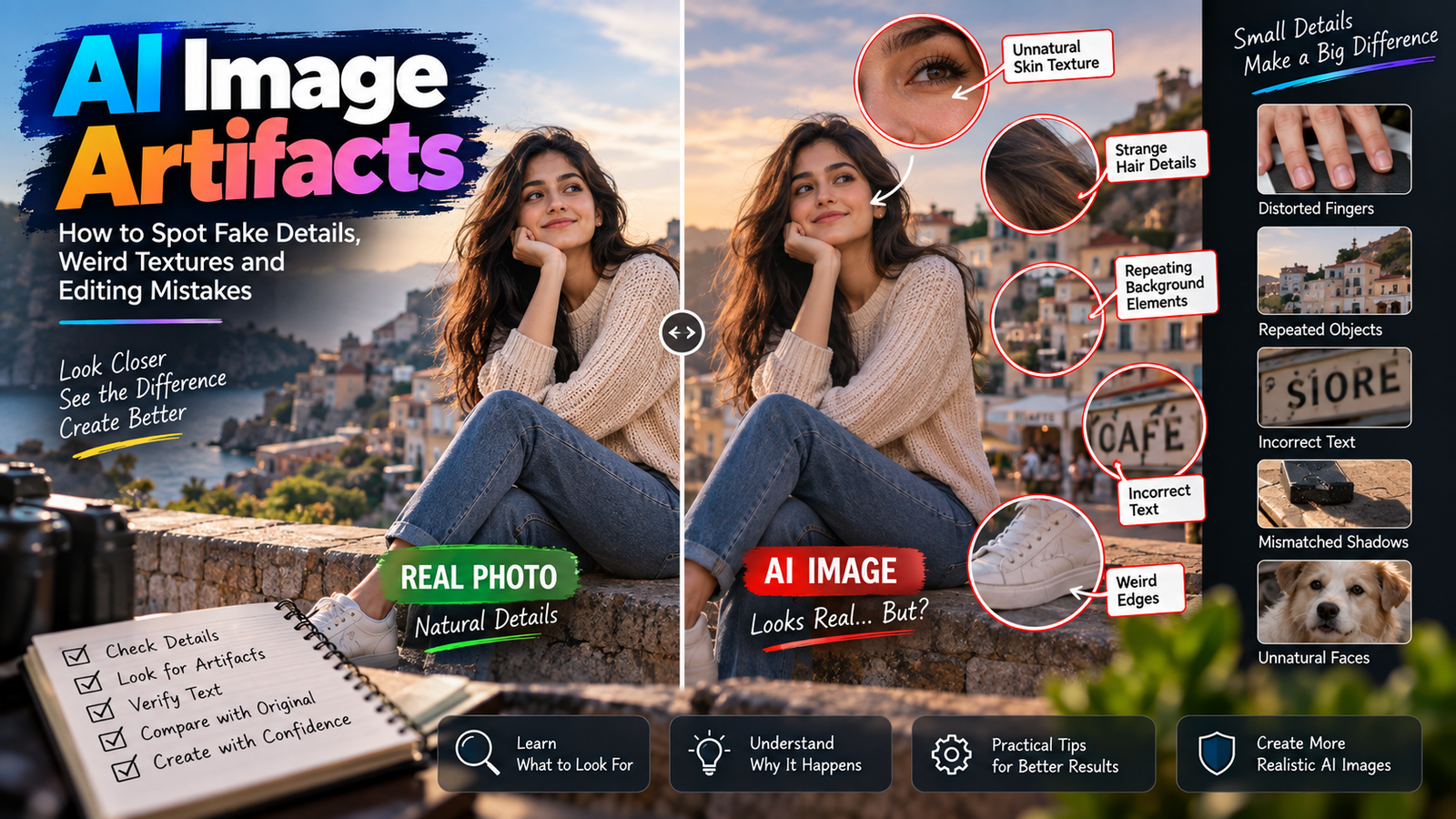
- Strange skin texture
- Repeated objects
- Unnatural edges
- Distorted fingers
- Incorrect text
- Impossible reflections
- Glowing outlines
- Plastic-looking materials
- Inconsistent shadows
- Objects that blend into each other
Some artifacts are obvious.
Others are subtle enough that you may only notice them after looking at the image carefully.
That’s why understanding AI image artifacts is more useful than simply learning how to regenerate an image.
Why Do AI Image Artifacts Happen?
AI image generation is not the same as traditional photography.
A camera records light from a real scene.
A generative AI system creates an image based on patterns it has learned.
During generation or editing, the model has to make decisions about shapes, textures, lighting, objects and relationships between them.
Sometimes those decisions don’t perfectly match reality.
The result can look convincing overall while containing small inconsistencies.
For example, an AI may know what a wooden table generally looks like, but it doesn’t necessarily know that a particular scratch should appear only once.
It may create a texture that looks realistic but repeats unnaturally.
Not Every Imperfection Is an AI Artifact
This distinction is important.
Real photographs contain imperfections too.
You can find:
- Motion blur
- Lens flare
- Sensor noise
- Compression artifacts
- Dust
- Focus problems
- Reflections
- Shadows
So you shouldn’t look at every unusual detail and immediately conclude:
“This must be AI.”
The goal is to identify inconsistencies that don’t make sense within the image.
That’s a much more reliable approach.
The First Sign: Something Looks Too Perfect
One of the easiest things to notice is unnatural perfection.
For example, imagine a portrait where the skin has:
- No visible pores
- No tiny variations
- No natural texture
- Perfectly smooth transitions
It may look attractive.
But real skin usually has variation.
AI can sometimes create an overly polished surface because it associates certain visual patterns with high-quality portraits.
The result may resemble a beauty filter more than an untouched photograph.
Plastic-Looking Skin
This is one of the most common problems in AI portraits.
The skin may appear:
- Smooth like plastic
- Slightly waxy
- Artificially bright
- Uniform in texture
- Too clean around the nose and cheeks
The problem isn’t simply that the skin is smooth.
Real photographs can have smooth-looking skin too.
The problem is when the texture doesn’t behave like natural skin.
For example, the face may have detailed eyes and hair but an unusually flat surface everywhere else.
That mismatch is a useful warning sign.
Strange Hair Texture
Hair can produce another type of artifact.
AI may create hair that looks convincing from a distance but becomes strange when enlarged.
You might see:
- Repeating strands
- Hair merging into the background
- Unnatural clumps
- Random strands appearing from nowhere
- Hair changing direction without explanation
Hair is difficult because individual strands are thin and frequently overlap other objects.
If the background is complex, separating hair from the environment becomes even harder.
Unnatural Edges Around a Person
Have you ever seen a person who looks slightly “cut out” from the background?
This can happen after AI background editing.
Look around:
- Hair
- Shoulders
- Arms
- Clothing
- Hands
You may notice a faint halo or an unusually sharp border.
The original photograph may have contained natural edge softness caused by the camera lens and lighting.
An AI-generated replacement can sometimes have a different edge structure.
The subject may therefore appear pasted onto the new background.
This is especially noticeable when the foreground and background have different levels of sharpness.
The Halo Effect
A halo is a bright, dark or blurry outline that appears around an object.
For example, imagine a person standing against a bright sky.
After an AI background replacement, you might notice a thin light outline around the person’s hair and shoulders.
That outline isn’t necessarily part of the original lighting.
It can be a blending artifact.
Zooming in around the subject’s edges is one of the fastest ways to find this type of problem.
Background Repetition
AI-generated backgrounds can contain another subtle issue:
repeated elements.
Imagine a street scene containing several parked bicycles.
At first glance, everything looks normal.
But after closer inspection, two bicycles may have nearly identical shapes and details.
The same can happen with:
- Windows
- Chairs
- Trees
- Buildings
- Lamps
- People
- Cars
One repeated object isn’t automatically proof of AI.
Real environments contain repetition too.
The clue is when the repetition looks unnaturally similar or physically impossible.
Why Repeated Patterns Happen
Many objects contain repeating visual structures.
AI learns patterns associated with those objects.
When generating a large environment, it can reuse similar patterns in ways that look convincing from a distance.
The problem becomes visible when the same pattern appears too consistently.
For example, a brick wall should contain variation.
If several bricks appear almost identical in shape and lighting, the surface may start looking synthetic.
Watch Out for Impossible Object Connections
One of the strongest signs of an AI mistake is when two objects don’t interact correctly.
Imagine:
- A hand holding a cup
- A person sitting on a chair
- A bag hanging from a shoulder
- A person leaning against a wall
The objects need to make physical sense together.
If the hand appears to pass through the cup, or a bag strap disappears into the person’s body, something is wrong.
These aren’t simply aesthetic problems.
They’re relationship errors.
Objects Should Have Consistent Depth
Objects in a photograph occupy different distances from the camera.
That affects:
- Size
- Sharpness
- Perspective
- Lighting
- Shadows
If a background object appears sharper than a nearby subject without a good reason, the image may feel unnatural.
The same applies to object size.
A chair in the background shouldn’t suddenly be nearly as large as a person standing much closer to the camera.
AI can sometimes get individual objects right while getting their spatial relationship wrong.
Perspective Errors Can Be Subtle
Perspective mistakes are particularly interesting because everything may look “real” individually.
Imagine a table photographed from an angle.
The edges of the table should follow the perspective of the camera.
If AI replaces part of the table but gives the new section a slightly different perspective, you may notice that the geometry feels wrong.
The same can happen with:
- Roads
- Buildings
- Hallways
- Windows
- Furniture
- Tiles
You may not immediately identify the exact problem.
You simply feel that something doesn’t fit.
That feeling is often worth investigating.
Shadows Are One of the Best Reality Checks
Whenever AI adds or changes an object, inspect its shadow.
Ask:
Where is the light coming from?
Then ask:
Does the shadow agree with that direction?
If the sun is clearly coming from the left, but an object’s shadow behaves as though the light is coming from the right, there’s an inconsistency.
Also check whether the shadow:
- Touches the object naturally
- Has appropriate softness
- Matches the surrounding shadows
- Changes correctly with distance
A good AI edit needs more than a realistic-looking object.
The object needs to belong to the lighting environment.
Reflections Can Reveal Problems
Reflections are another excellent way to inspect an AI image.
Look at:
- Mirrors
- Windows
- Water
- Sunglasses
- Shiny cars
- Metal surfaces
A reflection should generally correspond to the object and environment around it.
AI may create an attractive reflection that doesn’t actually match the scene.
For example, a person could be facing one direction while their reflection appears to face another.
These errors can be surprisingly easy to miss at normal viewing size.
Text Is Still Worth Checking Carefully
AI-generated text can look almost correct.
That makes it particularly dangerous.
A sign might appear to contain a realistic word.
A product package may have convincing typography.
A poster may look professionally designed.
But zoom in and you may discover:
- Missing letters
- Extra letters
- Incorrect spelling
- Strange symbols
- Inconsistent spacing
If the exact text matters, never approve an AI-generated image simply because the typography looks convincing from a distance.
Read it.
Actually read every important word.
Logos Need Even More Attention
A logo isn’t just decoration.
It’s a specific visual identity.
AI may produce something that resembles a logo without reproducing it accurately.
Look for:
- Changed proportions
- Incorrect shapes
- Missing elements
- Modified lettering
- Slightly altered symbols
For commercial images, this can matter significantly.
If a brand logo must remain exact, don’t assume that AI will preserve it simply because the final image looks professional.
AI Can Change Small Details While Keeping the Big Picture
This is one reason AI artifacts are easy to miss.
Imagine a portrait where the:
- Pose is correct
- Background is beautiful
- Clothing looks good
- Lighting is convincing
But the person’s watch has changed.
Or the buttons on their shirt are different.
Or a small logo has disappeared.
The overall image still looks excellent.
That’s why reviewing an AI edit requires more than looking at the composition.
You need to inspect the elements that were supposed to remain unchanged.
Look for Inconsistent Texture
Texture is a useful diagnostic tool.
Real surfaces usually respond consistently to light.
For example:
- Wood has grain
- Metal has reflections
- Fabric has folds
- Skin has subtle texture
- Stone has irregularity
AI can sometimes generate a surface that looks realistic but doesn’t respond correctly to the lighting.
A wall may have texture that appears to float above the surface.
A shirt may contain folds that don’t follow the body’s movement.
A wooden table may have grain running in an impossible direction.
These are subtle but useful clues.
Fabric Can Reveal AI Mistakes
Clothing is often overlooked.
Look at:
- Seams
- Buttons
- Folds
- Patterns
- Sleeves
- Collars
The folds should generally follow the body’s shape and movement.
A patterned shirt should also maintain a believable pattern across different surfaces.
AI can sometimes create patterns that suddenly change direction or disappear around a fold.
The image may still look good overall.
But the clothing can reveal that the scene was generated or heavily altered.
Jewelry Is Surprisingly Difficult
Small accessories can create problems because they contain fine geometry.
Look carefully at:
- Earrings
- Rings
- Necklaces
- Watches
- Bracelets
- Glasses
Ask whether the object has a consistent shape.
A ring should wrap around a finger.
A necklace should follow the body.
An earring should connect naturally to the ear.
A watch strap should connect correctly around the wrist.
If the relationship between the accessory and the body looks impossible, the AI has probably struggled with the interaction.
Look at the Eyes, But Don’t Stop There
Eyes are often checked when reviewing AI portraits.
That’s reasonable.
Look for:
- Different eye shapes
- Misaligned pupils
- Strange reflections
- Uneven iris details
But don’t assume that perfect eyes mean the image is correct.
AI artifacts can exist elsewhere.
Check:
- Hands
- Hair
- Teeth
- Clothing
- Background
- Jewelry
- Text
- Shadows
A photograph can have an excellent face and still contain several other problems.
Teeth Can Look Too Uniform
AI portraits can sometimes produce teeth that appear unusually perfect.
Look for:
- Identical shapes
- Excessive brightness
- Strange spacing
- Unnatural alignment
Again, not every perfect smile is an AI artifact.
The useful question is whether the teeth look consistent with the rest of the photograph.
If the skin and lighting look natural but the teeth appear like a perfectly repeated row of identical shapes, that’s worth checking.
Background People Need Extra Attention
If an AI-generated scene contains multiple people, inspect the people in the background.
You may notice:
- Strange faces
- Incorrect limbs
- Unusual hands
- Merged bodies
- Repeated clothing
- Impossible poses
Background people are often small enough that these mistakes aren’t obvious until you zoom in.
If the people aren’t important to the image, you may never notice.
But if the image is being presented as a realistic photograph, these details can affect credibility.
Don’t Forget Reflections in Eyes
This is a more advanced check.
A real eye can contain small reflections of the surrounding environment.
If an AI-generated portrait contains highly detailed eyes, those reflections may sometimes look inconsistent with the lighting or scene.
You don’t need to analyze them scientifically.
Just ask:
Does the reflection make sense for the environment?
If the person is indoors but the eye reflection looks like a bright outdoor scene, that’s a clue that the image may contain generated inconsistencies.
Why Zooming In Is So Useful
At normal viewing size, your brain focuses on the overall scene.
It recognizes:
Person standing on a beach.
It doesn’t necessarily inspect every finger or brick.
Zooming in changes the task.
Now you can examine:
- Edges
- Texture
- Text
- Hands
- Jewelry
- Reflections
- Small objects
You don’t need to zoom into every pixel.
A practical approach is to inspect the areas most likely to contain errors.
A Simple Three-Level Inspection Method
Instead of staring at the entire image randomly, inspect it in three stages.
Level 1: Normal view
Ask:
Does the overall image make sense?
Look at composition, lighting and subject placement.
Level 2: Medium zoom
Check:
- Edges
- Clothing
- Objects
- Shadows
- Background
Level 3: Detail zoom
Inspect:
- Hands
- Eyes
- Text
- Logos
- Jewelry
- Fine textures
This takes very little time once you get used to it.
Compare the AI Edit With the Original
If you’re editing an existing photograph, the original image is your best reference.
Place the two versions side by side.
Look for unintended changes.
Ask:
- Is the face still the same?
- Is the clothing unchanged?
- Did the skin tone move?
- Did the body proportions change?
- Did the hands change?
- Did the lighting direction change?
This is especially important when the instruction was supposed to affect only one part of the image.
AI Artifacts Are Often Easier to Spot in Before-and-After Comparisons
An edited image can look completely normal when viewed alone.
But compare it with the original and suddenly you notice:
- A changed facial feature
- Different hair
- Missing accessories
- Changed clothing
- New background details
This is why keeping the original photograph isn’t just good file management.
It is also a useful quality-control tool.
Don’t Try to Fix Everything With Another Full Regeneration
Suppose you find one small artifact.
Your first reaction might be:
Generate the entire image again.
That can introduce new problems.
The new version may fix the background but change the person’s face.
Or fix the hands but alter the clothing.
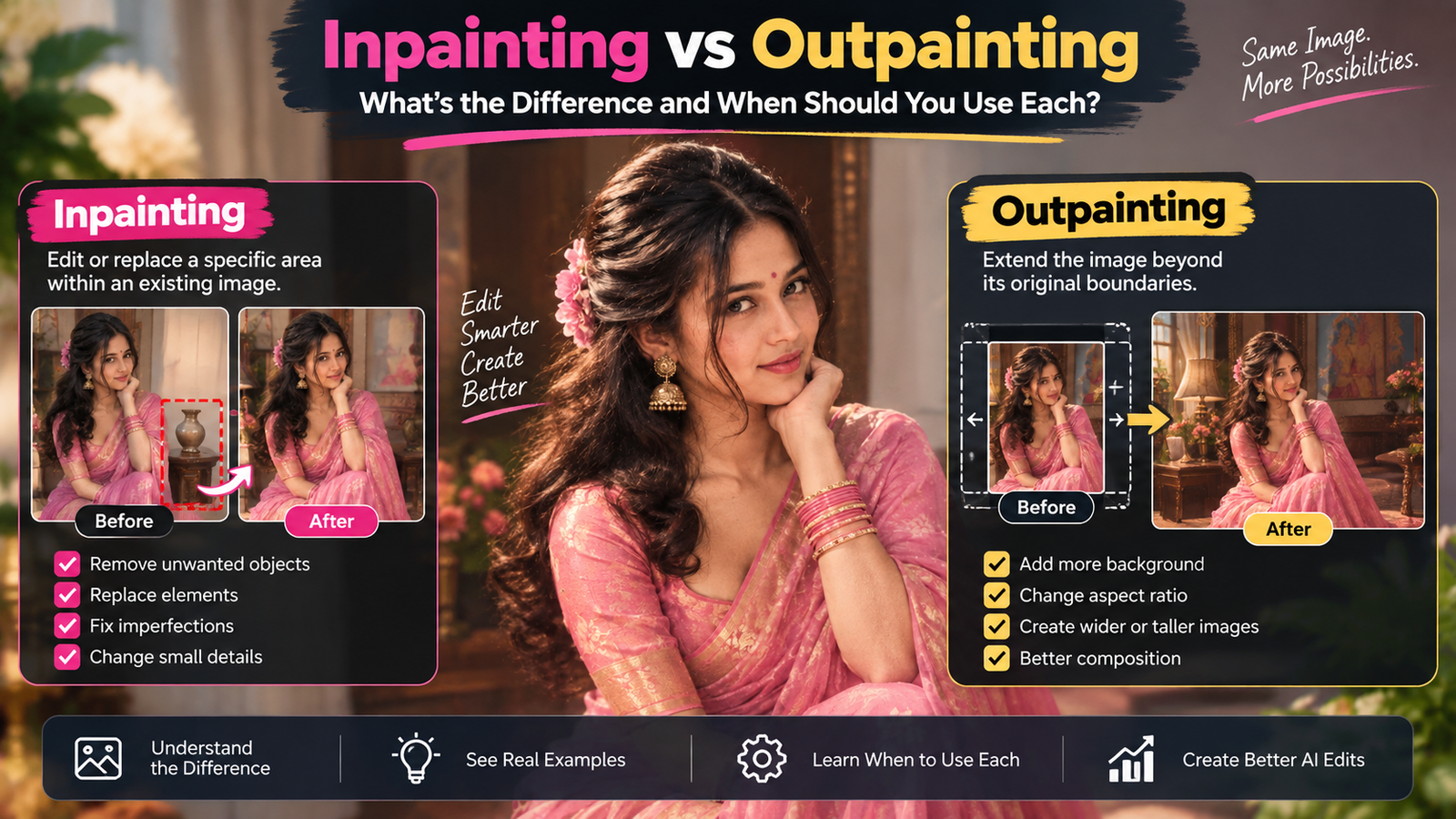
If your editing tool supports selective editing, it can be better to target the specific area.
The goal is to avoid changing things that were already correct.
Use the Smallest Necessary Edit
This is a useful principle for AI editing:
If one part is wrong, don’t automatically regenerate everything.
For example:
Problem
A distracting object appears in the background.
Better approach
Remove or edit that specific area.
Problem
Lighting on the face is slightly uneven.
Better approach
Correct the lighting while preserving the face.
Problem
One background element looks artificial.
Better approach
Modify that element rather than rebuilding the entire photograph.
Smaller edits can reduce unnecessary changes.
Artifact Detection Is Different From AI Detection
These terms are easy to confuse.
Artifact detection means looking for visual inconsistencies or unwanted generated details.
AI detection generally refers to trying to determine whether an image was created or modified using AI.
They aren’t the same thing.
You can find an AI artifact in an image, but that doesn’t necessarily tell you exactly which AI tool was used.
And an image can be AI-generated without containing an obvious artifact.
That’s why visual inspection alone isn’t a universal AI detector.
AI Images Can Look Real Without Being Photographs
This is an important idea.
A realistic-looking image doesn’t necessarily mean a camera captured the scene.
AI systems can generate:
- Realistic lighting
- Realistic skin
- Realistic environments
- Realistic reflections
- Realistic depth
The result can look photographic.
The absence of obvious artifacts doesn’t prove that the image is a camera photograph.
It simply means the generated image doesn’t have easily visible mistakes.
What Makes an AI Edit Look Convincing?
A convincing AI edit usually has consistency across multiple elements.
The:
- Subject
- Background
- Lighting
- Shadows
- Perspective
- Color
- Texture
- Depth
need to work together.
You don’t need every pixel to be perfect.
You need the relationships to make sense.
That’s why a technically simple edit can look more realistic than a highly detailed edit that gets the lighting or perspective wrong.
The “Consistency Test”
Here’s a useful way to review any AI-edited photograph.
Choose one object.
Then follow it through the image.
Ask:
Does its lighting match the environment?
Does its shadow make sense?
Does its perspective match the camera?
Does its texture behave naturally?
Does it interact correctly with nearby objects?
If the answer is yes across these areas, the object is likely integrated well.
This is much more useful than simply asking whether the object “looks realistic.”
A Realistic Image Can Still Have One Bad Element
Don’t fall into the opposite trap either.
Finding one strange detail doesn’t automatically mean the entire image is useless.
For example, perhaps the background contains a distorted sign that isn’t important to the photograph.
You may be able to fix that specific area.
Quality control isn’t about rejecting everything that isn’t perfect.
It’s about identifying problems that matter and deciding whether they can be corrected.
When You Should Be More Careful
Extra attention is worthwhile when the image is being used for:
- Advertising
- Product photography
- Professional portfolios
- News or documentary material
- Historical content
- Important personal photographs
- Commercial branding
In these situations, small changes can have bigger consequences.
For casual creative work, you may be more comfortable accepting minor imperfections.
The appropriate standard depends on the purpose of the image.
A Practical Final Review Checklist
Before publishing an AI-generated or AI-edited photograph, quickly inspect:
Subject
Does the person or main object still look correct?
Face
Are the important facial features consistent?
Hands
Are fingers and object interactions believable?
Hair
Do the edges and texture make sense?
Clothing
Do folds, buttons and patterns behave naturally?
Background
Are there repeated or impossible objects?
Lighting
Does the light come from a consistent direction?
Shadows
Do shadows match the objects?
Perspective
Does everything appear to exist in the same space?
Text
Is every important word actually correct?
Reflections
Do mirrors, glass and shiny surfaces make sense?
Edges
Are there halos or cut-out effects?
This checklist takes much less time than fixing a bad image after publication.
A Better Mindset for AI Image Editing
The biggest improvement isn’t learning another prompt.
It’s learning how to inspect the result.
AI tools are becoming better at producing attractive images.
That means the obvious mistakes are becoming less common.
The remaining mistakes can be subtle.
Instead of asking:
“Did the AI make a good image?”
ask:
“What changed?”
Then ask:
“Was that change intended?”
And finally:
“Does the new information make physical and visual sense?”
Those three questions can catch a surprising number of problems.
Final Thoughts
AI image artifacts are not always dramatic distortions.
Sometimes they’re tiny inconsistencies that appear only when you inspect an image closely: unnatural skin texture, repeated background elements, incorrect reflections, strange object connections, mismatched shadows, broken text or halos around a subject.
The important thing is not to treat every imperfection as proof that an image is AI-generated.
Real photographs have imperfections too.
Instead, look for inconsistency.
Does the lighting agree with the shadows? Does the hand actually hold the object? Does the clothing follow the body? Does the reflection match the scene? Does the background perspective fit the camera? Does the text actually say what it is supposed to say?
Once you develop that habit, reviewing AI images becomes much easier.
And perhaps the most useful rule is this:
Don’t judge an AI image only from a distance.
Look at the whole scene first, then inspect the details that matter.
A good AI workflow isn’t finished when the image looks impressive.
It’s finished when the image still makes sense after you look closely.