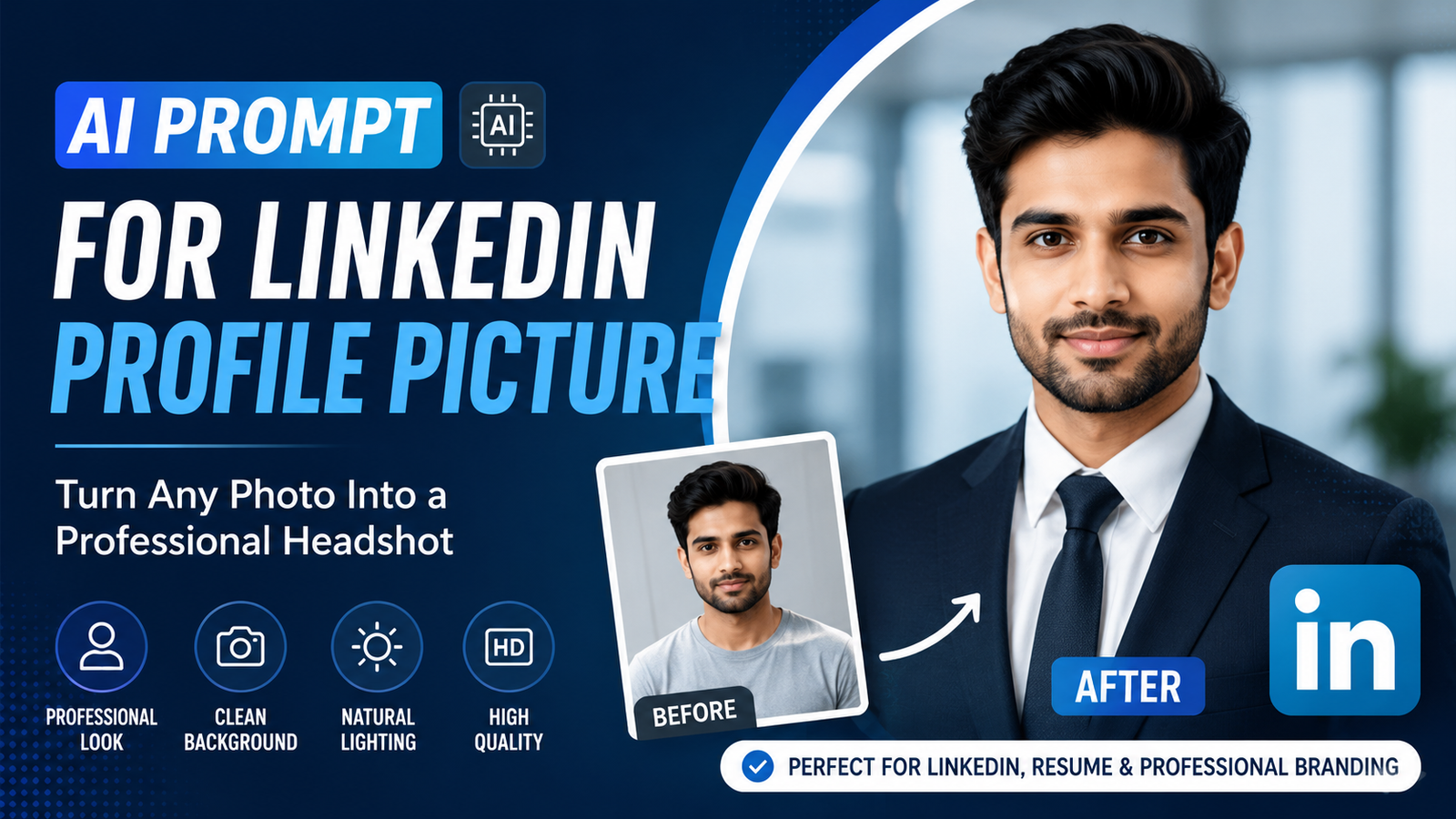
AI Prompt for LinkedIn Profile Picture ka use karke aap apni existing photo ko professional-looking headshot mein transform kar sakte hain. LinkedIn profile picture aapke professional profile ka important visual element hota hai, isliye photo clean, natural aur trustworthy dikhni chahiye.
Har kisi ke paas professional photographer ke paas jaakar headshot banwane ka time ya budget nahi hota. AI photo editing tools ki help se ek normal portrait ko improve karke professional profile picture ke liye suitable banaya ja sakta hai.
Lekin sirf “make this photo professional” jaisa short prompt dene se desired result hamesha nahi milta. Better results ke liye background, lighting, clothing, facial features, composition aur natural appearance ke baare mein clear instructions dena important hai.
Is article mein aapko ek detailed AI Prompt for LinkedIn Profile Picture milega, jise aap compatible AI image editing tool mein customize karke use kar sakte hain.
AI Prompt for LinkedIn Profile Picture
Neeche diya gaya prompt professional LinkedIn headshot create karne ke liye designed hai:
“Transform this photo into a professional LinkedIn profile picture. Keep my identity, facial features, face shape, hairstyle, natural skin tone and expression unchanged. Improve the lighting with soft, balanced professional studio lighting and create a clean, subtle office-style background with realistic depth of field. Make the clothing look polished and professional without changing my natural body proportions. Use a well-composed head-and-shoulders portrait with the face clearly visible and centered. Maintain realistic skin texture, natural facial details, accurate colors and realistic shadows. Remove distracting background elements and minor visual imperfections without over-retouching the face. The final image should look like a genuine professional corporate headshot captured with a high-quality camera, not an artificial or overly edited AI image.”
Ye prompt portrait ko completely change karne ke bajay uski professional presentation improve karne par focus karta hai.
Is AI Prompt Mein Kya Special Hai?
Ek professional profile picture mein sirf background change karna enough nahi hota. Photo ke multiple elements ko balance karna zaroori hota hai.
Natural Facial Features
Prompt AI ko facial identity aur natural features preserve karne ke liye instruct karta hai.
Iska purpose ye hai ki editing ke baad face unnecessarily different na lage.
Professional Lighting
Soft studio lighting portrait ko clean aur polished appearance de sakti hai.
Bahut harsh lighting face par unwanted shadows create kar sakti hai, isliye balanced lighting ka instruction useful hai.
Clean Background
Professional profile picture mein background distracting nahi hona chahiye.
Prompt mein subtle office-style background aur realistic depth of field specify ki gayi hai, jisse attention main subject par rahe.
Natural Skin Texture
AI editing mein excessive skin smoothing se face artificial lag sakta hai.
Isliye prompt natural skin texture aur realistic facial details maintain karne ke liye kehta hai.
Head-and-Shoulders Composition
LinkedIn profile image chhote size mein bhi clearly visible honi chahiye. Head-and-shoulders composition face ko prominent rakhne mein help kar sakti hai.
LinkedIn Profile Picture Ke Liye Photo Kaisi Honi Chahiye?
AI editing se pehle original image achhi quality ki hona useful hai.
Aap ideally aisi photo choose karein jisme:
- Face clearly visible ho
- Image blurry na ho
- Face par extreme shadow na ho
- Subject camera ki taraf reasonably positioned ho
- Image mein unnecessary objects kam hon
- Facial details clearly visible hon
- Original photo high enough resolution ki ho
Agar original image bahut dark ya heavily blurred hai, to AI ke paas accurate details preserve karne ke liye limited information ho sakti hai.
Background Ko Professional Kaise Rakhein?
LinkedIn profile picture ke liye background simple rakhna generally better hota hai.
Aap AI prompt mein different background styles try kar sakte hain.
Office Background
“Create a subtle modern office background with soft natural depth of field.”
Studio Background
“Replace the background with a clean neutral professional studio.”
Minimal Background
“Use a simple clean background with subtle professional tones and no distracting objects.”
Background choose karte waqt sabse important baat ye hai ki woh subject se attention na le.
Clothing Ko Professional Kaise Banayein?
Agar original photo mein casual clothing hai, to AI editing tool clothing ko more professional appearance dene mein help kar sakta hai.
Example instruction:
“Make the clothing look polished and professional while preserving realistic proportions, fabric texture and natural appearance.”
Aap formal shirt, blazer ya business-casual appearance ke liye specific instructions add kar sakte hain.
Lekin clothing change karte waqt face aur body proportions preserve karne ki instruction dena useful hai.
AI Se Face Retouching Karte Samay Dhyan Rakhein
Professional photo ka matlab heavily edited face nahi hota.
Bahut zyada:
- Skin smoothing
- Face reshaping
- Eye enhancement
- Teeth whitening
- Facial feature changes
photo ko unnatural bana sakte hain.
Better approach subtle retouching hai.
Aap prompt mein likh sakte hain:
“Apply only subtle professional retouching while preserving natural skin texture and original facial characteristics.”
Isse AI ko excessive editing avoid karne ke liye clearer direction milti hai.
LinkedIn Profile Picture Mein Lighting Important Kyun Hai?
Lighting portrait ki overall appearance ko significantly affect karti hai.
Poor lighting mein:
- Face dark dikh sakta hai
- Background distracting lag sakta hai
- Skin tone inaccurate ho sakti hai
- Facial details lose ho sakte hain
Professional lighting ke liye AI prompt mein soft, balanced aur natural lighting specify karna useful hai.
Aap ye instruction bhi use kar sakte hain:
“Use soft directional lighting with natural highlights and realistic shadows.”
AI-Edited Photo Ko Natural Kaise Rakhein?
AI image editing mein sabse important cheez realism hai.
Agar edited image bahut perfect ya overly processed lagti hai, to professional profile ke liye woh less authentic feel ho sakti hai.
Isliye prompt mein ye terms useful ho sakti hain:
- Photorealistic
- Natural skin texture
- Realistic shadows
- Accurate colors
- Natural facial details
- Subtle retouching
- Professional photography
- High-quality camera look
Saath hi “avoid over-retouching” jaise instructions bhi add kiye ja sakte hain.
Agar Background Achha Generate Na Ho To Kya Karein?
Agar first result mein background unrealistic lage, to poora prompt dobara likhne ki zarurat nahi hai.
Ek short refinement prompt try karein:
“Keep the person exactly unchanged. Make the background simpler, more realistic and less distracting. Match the background lighting with the subject and maintain natural depth of field.”
Is tarah AI ko sirf unwanted part improve karne ke liye direction milti hai.
Agar Face Change Ho Jaye To?
Agar AI editing ke baad facial features noticeably change ho jaate hain, to preservation instructions stronger bana sakte hain.
Example:
“Preserve the original identity and facial structure exactly. Do not alter the eyes, nose, mouth, jawline, face shape or natural expression.”
Is instruction ko original prompt mein bhi add kiya ja sakta hai.
LinkedIn Profile Picture Ke Liye Best Composition
Profile picture mein face clearly visible hona important hai.
Aap AI ko ye instruction de sakte hain:
“Use a centered head-and-shoulders composition with sufficient space around the head and shoulders.”
Bahut wide composition mein face chhota dikh sakta hai, jabki bahut close crop mein image uncomfortable lag sakti hai.
Balanced framing professional appearance maintain karne mein help karti hai.
AI Prompt Ko Apni Profession Ke According Customize Karein
Har professional ke liye same visual style suitable nahi hota.
For example, corporate professional ke liye formal appearance appropriate ho sakti hai, jabki designer, photographer ya content creator ke liye modern creative appearance better fit ho sakti hai.
Corporate Professional
“Create a polished corporate headshot with formal professional styling and a clean office background.”
Freelancer
“Create a modern professional portrait with a clean creative workspace background and natural lighting.”
Content Creator
“Create a professional yet approachable portrait with a modern creative background and natural studio lighting.”
Business Owner
“Create a confident professional business portrait with elegant lighting and a clean premium office environment.”
AI Photo Editing Mein Common Mistakes
1. Bahut Short Prompt
“Make professional photo” jaise prompts mein enough information nahi hoti.
Better hai exact changes describe karein.
2. Face Ko Over-Edit Karna
Professional appearance ke liye natural facial details preserve karna important hai.
3. Unrealistic Background
Agar background aur subject ki lighting match nahi karti, to image edited lag sakti hai.
4. Excessive Sharpening
Bahut zyada sharpness skin aur hair ko unnatural bana sakti hai.
5. Wrong Clothing
Professional image ke liye clothing context ke according honi chahiye.
6. Identity Change
AI ko subject ke facial characteristics preserve karne ki clear instruction deni chahiye.
AI-Edited LinkedIn Photo Publish Karne Se Pehle Checklist
Final image use karne se pehle ye points check karein:
- Face natural dikh raha hai?
- Facial identity preserve hui hai?
- Eyes realistic hain?
- Hair natural hai?
- Skin texture excessive smooth nahi hai?
- Clothing realistic hai?
- Background distracting nahi hai?
- Lighting subject ke saath match kar rahi hai?
- Shadows natural hain?
- Image professional aur approachable lag rahi hai?
Agar inmein se kisi area mein problem ho, to final image use karne se pehle AI se refinement karna better hai.
AI Photo Editing Ko Human Review Ki Zarurat Kyun Hai?
AI tools powerful hain, lekin generated result ko automatically perfect assume nahi karna chahiye.
Kabhi-kabhi AI:
- Facial details modify kar sakta hai
- Clothing ke patterns change kar sakta hai
- Background objects distort kar sakta hai
- Lighting inconsistent kar sakta hai
- Small details incorrectly generate kar sakta hai
Isliye final image ko carefully review karna important hai.
LinkedIn Profile Picture Ke Liye AI Prompt Ka Best Use
Ek effective workflow ye ho sakta hai:
Original Photo → Detailed AI Prompt → First Result → Review → Refinement Prompt → Final Image
Pehle original photo upload karein aur detailed prompt provide karein.
Result generate hone ke baad image ko carefully check karein.
Agar background, lighting ya retouching mein problem hai, to targeted refinement prompt use karein.
Is process se aap unnecessarily multiple elements ko change karne se bach sakte hain.
Frequently Asked Questions
AI Prompt for LinkedIn Profile Picture Kya Hai?
AI Prompt for LinkedIn Profile Picture ek detailed instruction hai jo AI image-editing tool ko professional LinkedIn headshot create ya improve karne ke liye direction deti hai.
Kya AI Se Normal Photo Ko Professional Headshot Mein Convert Kar Sakte Hain?
Haan, compatible AI image-editing tools existing photos mein background, lighting, clothing aur overall presentation ko modify kar sakte hain.
Kya AI Face Ko Change Kar Sakta Hai?
AI editing ke dauran unwanted facial changes ho sakte hain. Isliye prompt mein identity aur facial features preserve karne ki clear instructions dena useful hai.
LinkedIn Profile Picture Ke Liye Background Kaisa Hona Chahiye?
Clean, simple aur non-distracting background professional appearance maintain karne mein help karta hai. Office, studio ya subtle neutral background suitable options ho sakte hain.
Kya AI Photo Ko Completely Retouch Karna Chahiye?
Nahi. Professional photo ke liye subtle retouching generally more natural appearance provide karti hai. Excessive skin smoothing aur facial modification avoid karna better hai.
Kya AI-Generated LinkedIn Photo Natural Lag Sakti Hai?
Haan, detailed instructions aur suitable source photo ke saath natural-looking result achieve kiya ja sakta hai. Final image ko manually review karna phir bhi important hai.
Conclusion
AI Prompt for LinkedIn Profile Picture ek useful way hai existing portrait ko more professional aur polished appearance dene ka. Ek effective prompt mein sirf “professional photo” likhne ke bajay identity preservation, lighting, background, clothing, composition, skin texture aur realism jaise details clearly specify karni chahiye.
Sabse important baat ye hai ki professional profile picture natural aur authentic lage. AI ka purpose aapki appearance ko completely change karna nahi, balki photo ki presentation ko improve karna hona chahiye.
Ek clear prompt, high-quality original photo aur careful final review ke combination se aap apne LinkedIn profile ke liye ek clean professional headshot create kar sakte hain.
Natural Appearance + Professional Lighting + Clean Background + Realistic Details + Clear AI Instructions = Better LinkedIn Profile Picture