If you’ve ever created an AI image and thought, “Everything looks good, but why did it add that?” you’ve already encountered one of the biggest challenges in AI image editing.
You ask for a clean portrait, but the AI adds unnecessary accessories. You request a realistic background, but suddenly there are extra people. You want to preserve a person’s face, yet the result subtly changes it.
This is where the idea of a negative prompt in AI image editing becomes useful.
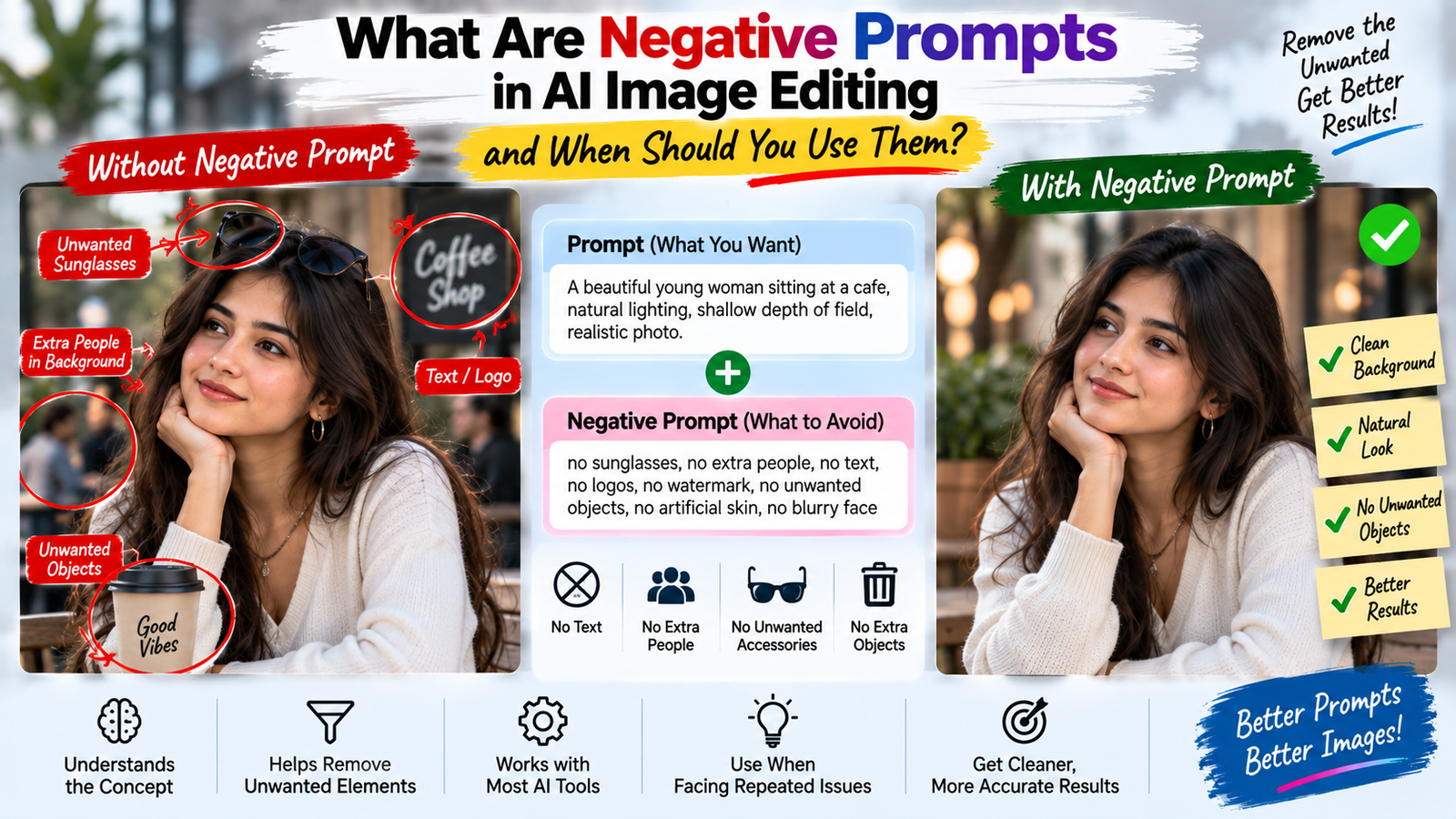
A negative prompt is essentially a way of telling an AI image tool what you don’t want in the result. But there’s a common misconception that adding a huge list of negative words automatically produces better images.
It doesn’t.
In fact, adding too many restrictions can sometimes make the instruction confusing or have little practical effect.
The useful approach is to understand when a negative prompt actually solves a problem, what it can realistically control, and when a normal positive instruction is enough.
What Is a Negative Prompt?
A negative prompt contains instructions about things you want the AI to avoid.
A normal prompt might say:
Create a natural outdoor portrait with soft evening light.
A negative instruction might add:
Avoid artificial-looking skin, extra accessories, distorted hands, excessive sharpening, and unnecessary background objects.
The first part describes what you want.
The second describes what you don’t want.
That’s the basic idea.
However, different AI tools handle negative prompts differently. Some have a dedicated negative-prompt field, while others expect all instructions to be written together.
So the exact workflow depends on the tool you’re using.
Why Negative Prompts Became Popular
Early AI image-generation communities quickly noticed recurring problems.
People would generate an image and repeatedly encounter:
- Extra fingers
- Distorted hands
- Strange eyes
- Unwanted objects
- Blurry details
- Text-like gibberish
- Overly smooth skin
- Unnatural anatomy
Users started adding lists of undesirable characteristics to their prompts.
Over time, large collections of negative keywords became common.
The problem is that many of these lists were copied from one workflow to another without considering whether they were actually useful for the new model.
That’s why you’ll sometimes see extremely long negative prompts containing dozens of words that have nothing to do with the image being created.
More isn’t necessarily better.
Positive Instructions vs Negative Instructions
The easiest way to understand negative prompting is to compare it with normal instructions.
Suppose you want natural skin.
A positive instruction could be:
Preserve realistic skin texture with subtle natural detail.
A negative instruction could be:
Avoid plastic-looking skin and excessive smoothing.
Both can help communicate the same general goal.
But positive instructions often have an advantage: they tell the model what to create, rather than only what to avoid.
That’s why I wouldn’t build an entire prompt around negative words.
Use them as supporting instructions when there is a specific problem to prevent.
When Should You Actually Use a Negative Prompt?
Negative prompts are most useful when you’ve identified a recurring unwanted result.
For example, suppose your AI-generated portraits repeatedly contain oversized sunglasses even though you never asked for them.
Instead of adding a huge negative list, you can specifically tell the model:
Do not add sunglasses or other eyewear unless requested.
That’s much more targeted.
The same principle works for:
- Unwanted jewelry
- Extra people
- Artificial skin
- Dramatic makeup
- Text
- Logos
- Unnecessary objects
- Excessive blur
- Strong color grading
A negative instruction is most valuable when it addresses an actual failure mode.
Don’t Use Negative Prompts Just Because Someone Else Does
This is one of the most important points.
You may find a prompt online containing:
bad anatomy, ugly, deformed, blurry, low quality, extra fingers, watermark, text, distorted face…
It might have worked for the person who created it.
That doesn’t mean you need to copy the entire list.
Different models behave differently.
Different images create different problems.
Different tools interpret instructions differently.
If your image doesn’t have a particular problem, there’s little reason to spend prompt space trying to prevent it.
Negative Prompts Can’t Guarantee Perfection
This is especially important with hands.
You could write:
no extra fingers, correct hands, perfect anatomy
and still get a strange hand.
Why?
Because the AI isn’t running a traditional rule-checking system where the phrase “no extra fingers” guarantees that exactly five fingers will appear.
The model still has to generate the hand visually.
Negative prompting can help communicate the desired outcome, but it isn’t a mathematical constraint.
That’s why the previous article about why AI-generated hands and fingers sometimes look wrong is relevant here.
Understanding the underlying problem is more useful than simply adding “no bad hands” to every prompt.
Negative Prompts Work Better When They’re Specific
Compare these:
Generic
No bad quality.
More useful
Avoid excessive sharpening, plastic-looking skin, artificial facial texture, and unnatural edge halos.
The second tells the AI more about what you’re trying to avoid.
Similarly:
Generic
No weird background.
More specific
Do not add extra people, signs, vehicles, or unrelated objects to the background.
The more closely your negative instruction matches the actual problem, the more useful it becomes.
Don’t Contradict Your Main Prompt
This is where negative prompts can become counterproductive.
Imagine your main instruction says:
Create a dramatic cinematic portrait with strong shadows and atmospheric fog.
Then your negative prompt says:
No shadows, no fog, no dramatic lighting.
You’ve created a contradiction.
The AI now receives two competing directions.
A better negative instruction would target the things you genuinely don’t want:
Avoid excessive fog, crushed shadows, artificial glow, and overprocessed skin.
The goal isn’t to cancel your creative direction.
It’s to remove unwanted side effects.
Negative Prompts for Realistic Portraits
Portraits are a common use case.
If your goal is a natural-looking photograph, useful negative instructions might focus on things such as:
- Plastic skin
- Excessive skin smoothing
- Unnatural facial proportions
- Overly dramatic makeup
- Artificial eyes
- Excessive beauty-filter effects
But don’t create a giant list simply because you’re making a portrait.
Start with your main instruction.
Then add a negative instruction only if the output consistently has a problem.
This makes your workflow much easier to troubleshoot.
Negative Prompts for Background Editing
Background replacement is another situation where unwanted additions can become annoying.
Suppose you want a quiet street scene.
The AI might add:
- Extra pedestrians
- Cars
- Signs
- Storefronts
- Random objects
If those additions don’t belong, a targeted negative instruction can help:
Avoid adding extra people, vehicles, signs, or unrelated objects that aren’t necessary for the scene.
Notice that you’re not saying:
No objects.
A street without any objects could look unnatural.
You’re simply preventing unnecessary additions.
Negative Prompts for Product Photography
Product images require a different mindset.
You may want to prevent:
- Extra objects
- Altered logos
- Incorrect text
- Unwanted accessories
- Unrealistic reflections
- Product shape changes
For example:
Keep the original product shape and packaging unchanged. Do not add accessories, modify the logo, invent label text, or change the product’s actual color.
This is more useful than a generic list containing “bad quality, ugly, blurry, distorted.”
The instruction is directly related to the purpose of the image.
For more information on maintaining product accuracy during AI editing, see our guide to AI product photo editing.
Negative Prompts and AI Photo Editing Are Slightly Different
There’s an important distinction between generating an image from scratch and editing an existing photograph.
When generating a new image, you have more freedom to describe the scene.
When editing an existing photograph, preservation becomes much more important.
For example:
Change the background but don’t change the person’s face.
This isn’t really a traditional negative prompt.
It’s a preservation instruction.
And in many editing situations, preservation instructions are more useful than a long negative list.
Preservation Is Often Better Than Saying “Don’t”
Consider this instruction:
No face changes.
It’s short, but vague.
A more useful preservation instruction might be:
Preserve the person’s original facial structure, eyes, nose, lips, expression, skin tone, hairstyle, and recognizable appearance.
The second gives the AI more context about what needs to remain stable.
This is one reason a good AI editing prompt often contains both:
What should change
and
What should remain unchanged.
Negative Prompts Can Help With Unwanted Text
AI-generated text has historically been a difficult area.
If you’re creating a clean photograph and don’t want random writing appearing in the background, you can explicitly say:
Do not add visible text, captions, logos, watermarks, or signs unless requested.
However, if you actually want a storefront sign, removing all text-related possibilities would conflict with the goal.
Again, context matters.
What About Watermarks?
If you’re generating your own image and want to prevent unnecessary generated marks or text-like artifacts, you can mention them as unwanted elements.
But don’t assume that a negative prompt can remove a watermark added by the platform itself.
A watermark added by an application is part of the application’s output or interface process, not necessarily something the image model is generating from your prompt.
That’s an important distinction.
Negative Prompt Lists Can Become Too Long
Search online and you’ll find negative prompts with huge lists of words.
They may look impressive.
But ask yourself:
Do all of these words apply to my image?
Probably not.
A long list can contain:
- Duplicate concepts
- Irrelevant restrictions
- Conflicting instructions
- Generic quality words
- Terms the model may interpret unpredictably
A short, relevant negative instruction is often easier to understand and maintain.
Don’t Repeat the Same Negative Word Ten Times
This is another common mistake.
For example:
blurry, blur, blurred, low blur, no blur, not blurry…
Repeating similar words doesn’t necessarily make the instruction stronger.
It just makes the prompt harder to read.
If your goal is to avoid excessive blur, say it clearly once.
For example:
Avoid excessive artificial blur and preserve natural photographic detail.
Simple.
Negative Prompting Doesn’t Replace Good Source Images
This is particularly important for AI photo editing.
Suppose your original image is:
- Extremely low resolution
- Severely blurred
- Poorly exposed
- Heavily compressed
You can write a perfect negative prompt, but the AI still has limited information.
The quality of the source image matters.
If you want better AI editing results, start with the best original photograph you can reasonably provide.
A prompt can’t always compensate for missing visual information.
Negative Prompts and Lighting
Lighting is another area where overly broad negative instructions can create problems.
Imagine you want a warm sunset portrait.
You shouldn’t write:
No orange, no yellow, no shadows, no highlights.
Those are characteristics of the scene you’re actually trying to create.
Instead, prevent the unwanted extremes:
Avoid oversaturated orange skin, clipped highlights, crushed shadows, and artificial glow.
That’s a much better use of negative prompting.
Negative Prompts and Skin Tone
If you’re editing portraits, be careful with color-related restrictions.
Suppose the original person has a naturally warm complexion.
A negative instruction such as:
No warm colors.
could unintentionally fight against the person’s natural skin tone.
Instead:
Preserve the original skin tone and avoid unnatural color shifts or excessive orange/gray skin.
The distinction is important.
You’re not trying to remove warmth.
You’re trying to prevent an unwanted color change.
When Negative Prompts Can Make Results Worse
Yes, this can happen.
If you add too many restrictions, you can unintentionally reduce the creative freedom needed to produce a coherent image.
For example, a prompt might request:
- Natural shadows
- No shadows
- Detailed texture
- No texture
- Cinematic lighting
- No dramatic lighting
- Realistic reflections
- No reflections
At that point, the model has conflicting signals.
The solution isn’t more negative prompting.
The solution is a clearer objective.
A Better Way to Troubleshoot AI Results
Instead of creating one giant negative prompt, use this process.
Generate the first result
Don’t try to prevent every possible problem.
Identify the actual problem
What specifically looks wrong?
Add one targeted restriction
Tell the AI what you want to avoid.
Generate again
See whether the problem improves.
Keep or remove the restriction
If it helps, keep it.
If it doesn’t, rethink the instruction.
This turns negative prompting into a practical troubleshooting tool rather than a collection of random keywords.
Example: Fixing an Unwanted Accessory
Imagine you ask for a casual portrait.
The AI keeps adding a necklace.
Your first prompt doesn’t mention jewelry.
Instead of adding twenty negative terms, try:
Keep the outfit simple and do not add necklaces, chains, earrings, or other accessories unless specifically requested.
Now the restriction directly addresses the problem.
If the necklace disappears but the AI starts changing the shirt, you know the next issue to solve.
This is much easier than trying to predict every possible mistake in advance.
Example: Preventing Background Clutter
Suppose you’re creating a portrait in a park.
The AI keeps adding random people and vehicles.
A targeted instruction could be:
Keep the background naturally populated but avoid unnecessary crowds, prominent vehicles, signs, or unrelated objects competing with the subject.
This preserves realism while controlling clutter.
A blanket instruction like “no objects” would make little sense for a real park.
Example: Protecting an Existing Face
For an existing photograph, you could write:
Change only the requested background area. Preserve the original person’s face, facial structure, expression, skin tone, hairstyle, body proportions, clothing, and pose.
This is often more useful than writing:
No face, no eyes, no nose, no mouth, no skin changes.
The preservation version communicates the relationship between the original image and the requested edit.
Dedicated Negative Prompt Fields vs Normal Instructions
Different AI tools have different interfaces.
Some provide:
Prompt
and
Negative Prompt
as separate fields.
Others provide only one text box.
If your tool has a dedicated negative-prompt field, you can use it for the unwanted characteristics.
If it doesn’t, you can usually express the same concept in your normal instruction using phrases such as:
- Avoid
- Do not add
- Keep unchanged
- Preserve
- Without changing
Don’t worry too much about finding the “perfect negative prompt syntax.”
The tool you’re using matters more than a universal formula.
Should Beginners Use Negative Prompts?
Yes, but don’t make them the starting point.
If you’re new to AI image editing, first learn how to describe:
- Subject
- Action
- Environment
- Lighting
- Composition
- Requested change
- Preservation requirements
Once you understand those fundamentals, negative instructions become much easier to use.
Otherwise, you can end up spending more time writing a giant list of things you don’t want than actually explaining what you do want.
The “Don’t Change Anything Else” Problem
A phrase like:
Don’t change anything else.
can be useful, but it’s not always specific enough.
If the AI is changing the face, what exactly should remain?
If the clothing is changing, what about its texture?
If the background is being replaced, should the lighting change too?
Instead of relying entirely on “don’t change anything else,” identify the important elements.
For example:
Change the background while preserving the person’s face, hairstyle, clothing, pose, body proportions, original lighting direction, and camera perspective.
That’s much more actionable.
Negative Prompts Are Not Magic Filters
This is worth repeating because it prevents a lot of frustration.
A negative prompt isn’t a guarantee that the AI will never produce the unwanted feature.
It’s an additional instruction.
The model still has to interpret the complete image and generate a coherent result.
That’s why you should judge negative prompting by whether it improves your specific workflow, not by how long the negative prompt looks.
A Practical Rule: Describe the Result You Want First
If you’re writing a new prompt, start with the positive instruction.
For example:
Create a realistic outdoor portrait with soft natural lighting and subtle background blur.
Then, if you repeatedly encounter a problem:
Avoid excessive skin smoothing, artificial glow, and unnecessary accessories.
This order keeps your objective clear.
You’re telling AI what success looks like before telling it what mistakes to avoid.
When You Don’t Need a Negative Prompt
You probably don’t need one when:
- The AI is already following your instructions
- The image is simple
- You’re making a small edit
- There are no recurring unwanted elements
- Your tool doesn’t respond meaningfully to negative instructions
Don’t add complexity just because you think a professional prompt is supposed to contain negative keywords.
A short, clear prompt that works is better than a complicated prompt that looks impressive.
Final Thoughts
A negative prompt in AI image editing is useful when you need to prevent a specific unwanted result, but it shouldn’t become a giant collection of random keywords.
Start by describing what you actually want.
Then identify what the AI keeps getting wrong.
Add a targeted restriction for that particular problem and test the result.
For existing photographs, preservation instructions can often be more useful than traditional negative prompts because they clearly tell the AI which parts of the original image need to survive the edit.
The biggest lesson is simple:
Don’t tell AI everything you don’t want before you’ve clearly explained what you do want.
A good editing instruction has a clear goal, sensible restrictions, and enough preservation guidance to keep the original image recognizable.
That’s usually far more effective than copying a massive negative-prompt list from someone else’s workflow.