When you edit a photograph with an AI tool, most people look at the visible result and stop there.
The face looks good.
The background looks natural.
The colors are better.
The image is ready to upload.
But there is another part of a digital photograph that isn’t immediately visible: metadata.
Metadata is information stored alongside an image file. Depending on the camera, phone, editing software and export process, it can contain details about how the image was created, captured or modified.
For anyone working with AI-generated or AI-edited photographs, understanding metadata is useful for a simple reason:
The image you can see and the information stored inside the file are not exactly the same thing.
A photograph can look completely normal while its metadata tells you something about the camera, software, dimensions, date or other technical properties.
This doesn’t mean every AI-edited image contains obvious information saying “AI EDITED.”
In many cases, it doesn’t.
That’s why AI image metadata is better understood as a technical layer of a photograph rather than a reliable AI detector.
What Is Image Metadata?
Metadata is basically information about an image.
Think about a photograph taken with a smartphone.
The visible part is the photograph itself.
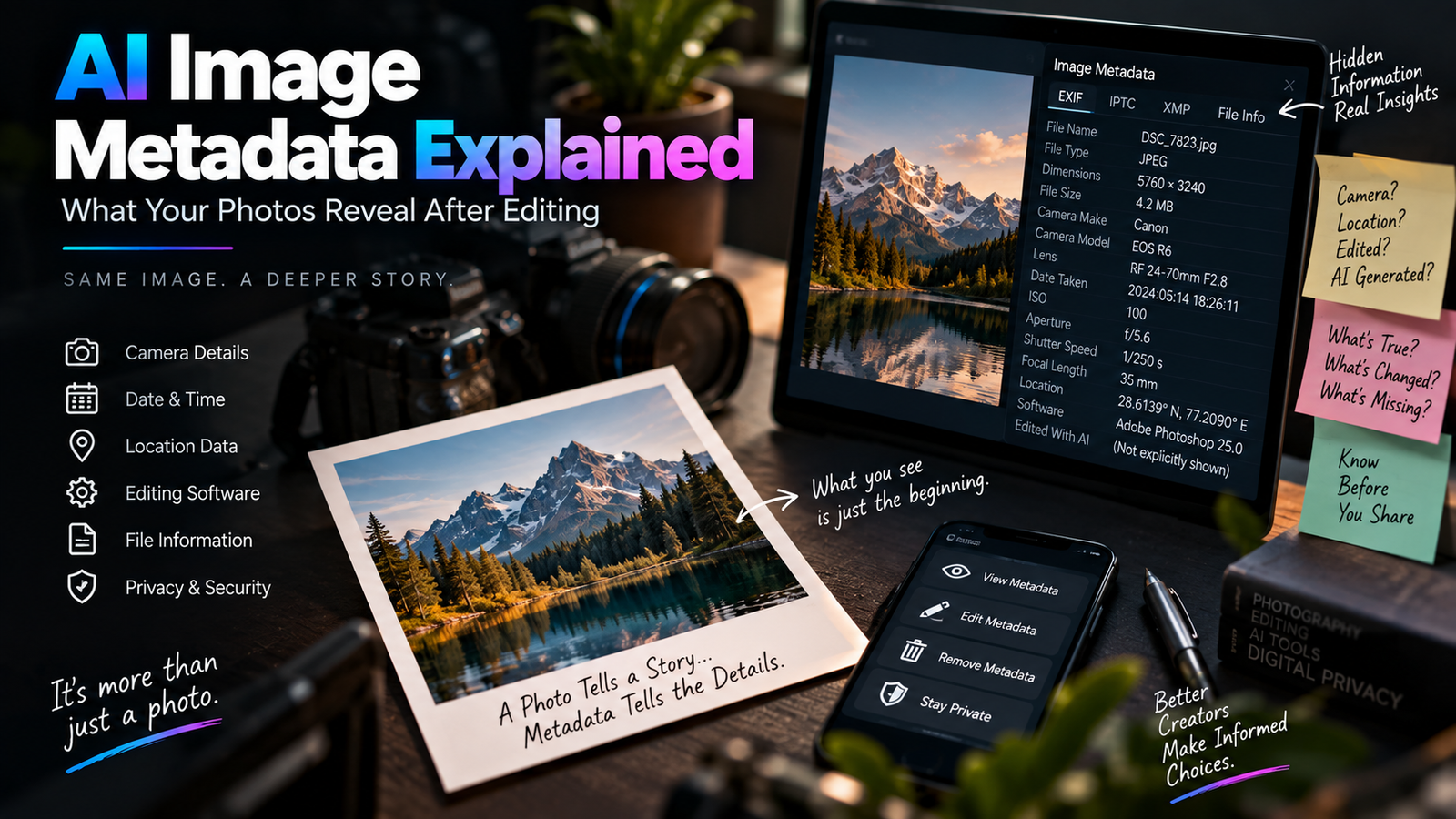
Behind that photograph, the file may also contain information such as:
- Image dimensions
- File type
- Camera manufacturer
- Camera model
- Lens information
- Exposure settings
- Date and time
- Orientation
- Software or editing application
- Color information
- Location data, if recorded and retained
Not every image contains all of these fields.
What is stored depends on the device and the way the image was processed.
That’s why two photographs that look almost identical can contain very different metadata.
Why Does Metadata Exist?
Metadata isn’t primarily designed to identify AI-generated images.
It exists because digital imaging systems need a way to store technical information about photographs.
A camera may record the settings used to capture an image.
An editing application may write information about the software used to process it.
A file-management system may store additional information about the file.
This information can be useful for:
- Photographers
- Editors
- Archivists
- Developers
- Digital asset managers
- Websites
- Workflows involving large image libraries
In other words, metadata is not some mysterious hidden layer created specifically for AI.
It has existed in digital photography for a long time.
What Is EXIF Metadata?
One of the most commonly discussed types of photo metadata is EXIF.
EXIF stands for Exchangeable Image File Format.
It is commonly associated with information recorded by digital cameras and smartphones.
Depending on the device, EXIF data can include things like:
- Camera model
- Lens
- ISO
- Shutter speed
- Aperture
- Focal length
- Date and time
- Orientation
- GPS coordinates
For photographers, this can be incredibly useful.
Imagine looking at an old photograph and wanting to know which lens was used.
If the EXIF information is still present, the answer may be stored inside the file.
Does Every Photo Have EXIF Data?
No.
This is an important point.
A photograph may contain EXIF data when it comes directly from a camera or phone.
But that information can disappear later.
For example, metadata may be changed or removed when an image is:
- Edited
- Exported
- Resized
- Converted to another format
- Uploaded to a platform
- Downloaded again
- Processed by another application
So you shouldn’t assume that every JPEG contains complete camera information.
A file can still be a perfectly genuine photograph even if most of its metadata has disappeared.
What Happens to Metadata During AI Editing?
This is where things get particularly interesting.
Suppose you take a photograph with your phone.
The original file might contain camera information.
You then upload it to an AI editing application.
The AI changes the background.
You download the result.
The final file may not contain exactly the same metadata as the original.
Some applications preserve certain fields.
Others remove them.
Some may add software-related information.
Others may export a completely new file with a much smaller set of metadata.
So there isn’t one universal rule for what happens to metadata after AI editing.
It depends on the tool and the export process.
Does AI Editing Automatically Add an “AI” Label?
Not necessarily.
This is one of the biggest misconceptions about metadata.
People sometimes assume that an AI-edited image will contain a hidden field saying:
Created by AI
That’s not guaranteed.
Some platforms or applications may add provenance or content credentials.
Others may not.
Some may retain software information without explicitly identifying the image as AI-generated.
And metadata can also be removed or altered during later processing.
So looking at metadata alone is not a reliable way to determine whether an image was created or edited with AI.
Metadata Is Not the Same as an AI Detector
This distinction matters.
Suppose an image contains software information associated with an image editor.
That tells you that the file was processed by that software.
It doesn’t automatically tell you exactly what happened.
The software could have been used for:
- Cropping
- Resizing
- Color correction
- Background removal
- AI generation
- Manual retouching
Likewise, if an image contains no obvious software metadata, that doesn’t prove that AI wasn’t used.
Metadata can provide clues.
It doesn’t automatically provide the complete history of an image.
What Is Software Metadata?
When an image is edited, the application used for processing may sometimes write information into the file.
Depending on the application and export method, you might see information related to:
- Editing software
- Processing software
- Export application
- File creation process
This can sometimes be useful when troubleshooting an image workflow.
For example, if you receive an image that has gone through several applications, software-related metadata can provide a clue about how the file was processed.
But again, don’t treat it as a complete editing history.
Why Metadata Can Disappear
Metadata isn’t permanently attached to the visual appearance of an image.
It’s information stored in the file structure.
When the file is rewritten, some metadata may not be copied into the new file.
For example:
Original photograph
→ AI editor
→ Export
→ Resize
→ Web optimization
At each stage, some information may be preserved while other information may be discarded.
By the time the image reaches a website, the metadata may look very different from the original camera file.
JPEG and Metadata
JPEG is widely used for photographs and can contain metadata.
This is one reason a JPEG isn’t simply “the picture.”
It can also contain technical information alongside the image data.
However, saving or exporting a JPEG doesn’t guarantee that every original metadata field will remain.
Different applications handle metadata differently.
This is also one reason we previously discussed the difference between JPEG, PNG and WebP.
The image format and the metadata stored inside the file are related concepts, but they aren’t the same thing.
What About PNG?
PNG can also contain certain types of metadata, although its typical metadata ecosystem differs from the EXIF-heavy workflow commonly associated with camera JPEGs.
A PNG created for a graphic or screenshot may contain very different information from a JPEG straight out of a camera.
This is another reason you shouldn’t assume:
PNG = no metadata
or:
JPEG = complete camera history.
Neither assumption is reliable.
The actual file needs to be inspected.
What About WebP?
WebP is increasingly common on websites because it can provide efficient image compression.
WebP files can also contain metadata.
But, as with JPEG and PNG, what metadata is actually present depends on how the file was created and processed.
A website might convert an uploaded JPEG into WebP for faster delivery.
The resulting WebP may not contain all the information that existed in the original camera file.
So if you are researching the history of an image, don’t automatically treat a website’s WebP copy as the original source file.
Can Metadata Tell You When a Photo Was Taken?
Sometimes.
If the original camera file contains date and time information, EXIF may record it.
But there are several reasons you shouldn’t blindly trust it.
The camera’s clock could have been incorrect.
The metadata could have been edited.
The file could have been exported later.
The information could have been removed.
A website could have generated a new file.
So metadata can provide useful evidence, but context matters.
Can Metadata Reveal Location?
Potentially, yes.
Some smartphones and cameras can store GPS coordinates in image metadata when location recording is enabled.
That means a photograph can potentially contain information about where it was taken.
This is an important privacy consideration.
Imagine taking a photograph at home and uploading the original file somewhere without realizing that location information is still attached.
Depending on the platform and file, that metadata could potentially reveal more than you intended.
For private photographs, it’s worth knowing whether location metadata is being retained.
AI Editing and Privacy
This is one of the more practical reasons to understand metadata.
When you’re uploading photographs to websites, AI tools or other services, you should think about more than the visible image.
The file itself may contain information you don’t want to share.
For example:
- Original camera model
- Capture date
- Location information
- Software details
- Other technical fields
Not every file contains sensitive information.
But checking before sharing can be a sensible habit, particularly with original camera files.
Should You Remove Metadata Before Publishing?
There isn’t one answer for every situation.
If you’re publishing a casual blog image, removing unnecessary metadata can be reasonable.
It can reduce unnecessary information and may slightly reduce file size.
If you’re a photographer who wants to retain copyright or authorship information, metadata may be useful.
If you’re working with an image archive, removing metadata could actually be harmful because you might lose useful historical information.
So the right question isn’t:
“Should metadata always be removed?”
It’s:
“Which metadata is useful for this particular image and purpose?”
Metadata Can Be Useful for Photographers
Photographers often use metadata as a technical record.
Imagine you take a photograph that turns out exceptionally well.
Later, you want to recreate the same look.
The file may tell you:
- ISO
- Aperture
- Shutter speed
- Focal length
- Camera model
- Lens information
That can help you understand how the photograph was captured.
For AI editing workflows, keeping the original camera file can also be useful because it preserves the source information before multiple rounds of editing and export.
AI-Edited Images Have Another Layer: Provenance
Modern AI image systems have created interest in content provenance.
Provenance is essentially about understanding where digital content came from and what happened to it.
This is broader than traditional EXIF metadata.
A provenance system can potentially communicate information about:
- Creation
- Editing
- Software
- Source material
- Transformations
One example of this broader approach is the use of Content Credentials and related standards.
The important thing to understand is that provenance is trying to answer a different question from ordinary metadata.
Traditional metadata might tell you:
Which camera created this file?
Provenance can aim to tell you:
What happened to this content during its creation and editing history?
These systems are becoming increasingly relevant as AI-generated content becomes more common.
Why Provenance Is More Useful Than a Simple “AI Detected” Label
Imagine two images.
Image A
A camera photograph is manually color-corrected.
Image B
A camera photograph has its background completely regenerated with AI.
Both may contain editing software information.
If you only look at the software name, you may not understand the actual transformation.
A provenance system can potentially provide more meaningful information about the actions performed on the content.
That’s a more useful approach than assuming one piece of metadata can tell the entire story.
Can Metadata Be Changed?
Yes.
Metadata isn’t necessarily permanent.
Depending on the file and software, metadata can be edited, removed or rewritten.
That’s why metadata shouldn’t automatically be treated as unquestionable evidence.
If someone changes the date stored in a file, the photograph doesn’t physically change.
The metadata has changed.
Similarly, if metadata is removed, that doesn’t prove that the underlying photograph was created without the information that used to be there.
Can Someone Add Fake Metadata?
In principle, yes.
Because metadata can be modified, someone could potentially insert information that doesn’t accurately represent the image’s history.
That’s another reason metadata should be treated as one source of information rather than absolute proof.
If the origin of an image really matters, you should consider additional evidence such as:
- Original files
- Source photographs
- Version history
- Platform records
- Provenance information
- Trusted archives
The more important the claim, the less sensible it is to rely on a single metadata field.
What Happens When You Screenshot an Image?
Screenshots are interesting because they often create a new image file.
Suppose you open a photograph on your phone and take a screenshot.
The screenshot isn’t necessarily the same file as the original photograph.
It contains the pixels displayed on the screen at that moment.
Some original camera metadata may no longer be present.
The screenshot can therefore break part of the original file’s metadata chain.
This is another reason why downloading an image, taking a screenshot, resizing it and re-exporting it can make it difficult to reconstruct the original history.
Social Media Can Change Your Image
When you upload a photograph to a social platform, the platform may process it.
It may:
- Resize it
- Compress it
- Convert the format
- Generate different versions
- Remove or change metadata
The exact behavior varies by service and can change over time.
That’s why the image you download from a social platform may not be identical to the file you originally uploaded.
For creators, this is one reason to keep your own original files instead of treating the platform copy as your master archive.
Why AI-Generated Images May Not Have Camera Metadata
If an image was generated entirely by an AI system rather than captured by a physical camera, there may be no genuine camera exposure information to record.
You might therefore not find traditional fields such as:
- Camera model
- Lens
- Shutter speed
- Aperture
- ISO
That doesn’t automatically prove the image is AI-generated.
A manually created graphic, screenshot or exported image can also lack traditional camera information.
Again, absence of metadata isn’t proof by itself.
What About an AI-Edited Photograph Taken With a Phone?
This situation is more complicated.
Suppose:
- You take a photograph with a phone.
- The original contains EXIF data.
- You upload it to an AI editor.
- The background is changed.
- The image is exported.
The final file could contain:
- Some original metadata
- New software information
- Reduced metadata
- Completely different metadata
- Almost no metadata
There is no universal outcome.
That’s why the AI image metadata of an exported file shouldn’t automatically be assumed to represent the metadata of the original photograph.
Why Keeping the Original Matters
If you work with AI editing regularly, create a simple habit:
Keep the original.
Don’t overwrite it with the AI-edited version.
For example:
Original_Photo.jpg
Then:
Background_Edit_v1.jpg
Then:
Background_Edit_Final.jpg
This gives you a basic history of your workflow.
If something goes wrong, you can return to the source.
If metadata is lost during an export, you still have the original file.
If you later want to try another AI editor, you don’t have to start from a compressed copy of the already-edited image.
Don’t Repeatedly Edit the Exported File
This isn’t only about metadata.
It’s also about image quality.
Imagine:
Original → AI edit → JPEG export → another AI edit → another JPEG export → resize → another export
Each step can introduce additional changes.
You may eventually get:
- Compression artifacts
- Reduced detail
- Color shifts
- Sharper edges
- Changed metadata
A cleaner workflow is:
Original → AI edit → high-quality master → final web/social export
Keep the master separate.
Metadata vs Visible Image Information
It’s useful to separate these two.
Visible information
What you can actually see:
- Person
- Background
- Objects
- Colors
- Lighting
- Composition
Metadata
Information stored alongside the image:
- Camera
- Date
- Location
- Software
- Dimensions
- Technical information
Editing the visible image doesn’t necessarily tell you what happened to the metadata.
Likewise, changing metadata doesn’t necessarily change the visible photograph.
They are different layers of the digital file.
Can Metadata Prove That a Photograph Is Real?
Not by itself.
This is probably the biggest takeaway from the whole topic.
A photograph with camera metadata isn’t automatically authentic.
A photograph without camera metadata isn’t automatically fake.
A file showing editing software doesn’t automatically mean the entire image was generated by AI.
A file without editing software information doesn’t prove that no editing happened.
Metadata is evidence.
It isn’t a universal truth machine.
Why This Matters More in the AI Era
Before generative AI became mainstream, digital editing already made image authenticity complicated.
Photos could be:
- Cropped
- Retouched
- Composited
- Color graded
- Manipulated
AI has expanded the possibilities dramatically.
You can now generate or reconstruct parts of a scene that weren’t present in the original photograph.
That makes understanding digital provenance more important.
If an image is being used simply as a creative social post, this may not matter much.
But if the image is being presented as documentary evidence, journalism, historical material or a representation of a real product, knowing its origin becomes much more important.
AI Editing Doesn’t Always Mean the Photograph Is “Fake”
This distinction is worth making.
Suppose you take a real photograph and use AI to remove a distracting person in the background.
The photograph started as a genuine camera capture.
But the final image has been modified.
Calling it simply “real” or “fake” doesn’t explain what happened.
A more useful description would be:
AI-edited photograph.
Likewise, if you change the entire background, you have made a much more substantial transformation.
The point is that transparency about editing can be more useful than trying to put every image into a simple real/fake category.
A Practical Metadata Checklist for Creators
Before publishing an AI-edited image, ask yourself:
Do I still have the original?
If not, create a habit of preserving originals from now on.
Does the file contain location information?
If privacy matters, check it.
Does the file contain unnecessary camera information?
Decide whether you want to keep it.
Does the final file contain software information?
It may, depending on the editing workflow.
Am I relying on metadata to prove authenticity?
Don’t.
Is the image being used for something where provenance matters?
If yes, keep the source and editing history.
This takes only a little effort and can save a lot of confusion later.
A Better Way to Think About AI Image Files
An image file isn’t just a picture.
It’s better to think of it as:
Visual content + technical information + file history
The visible photograph is what most people notice.
The technical information can help explain how the file was captured or processed.
The history is what tells you how the image moved through different stages.
Not every file preserves all three.
That’s why responsible image workflows keep the original and avoid assuming that one exported file contains the complete story.
What Beginners Should Remember
You don’t need to become an expert in digital forensics to understand metadata.
Just remember these principles:
Metadata is information about the file, not the photograph itself.
EXIF can contain camera and capture information.
AI editing may change, remove or add metadata depending on the tool.
Missing metadata does not prove an image is fake.
Editing software information does not automatically prove that AI generated the image.
AI-generated detail can exist without traditional camera metadata.
Keeping the original file is the best way to preserve your starting point.
These few ideas cover most of what a normal creator needs to know.
Final Thoughts
AI image metadata is useful, but it is often misunderstood.
Metadata can contain information about cameras, capture settings, dates, locations, software and other technical details. AI editing can change the image itself as well as the metadata associated with the exported file.
But metadata should never be treated as a perfect record of everything that happened to an image.
An AI-edited photograph may retain some original information, lose most of it, or receive new software-related information. A completely AI-generated image may not have traditional camera data at all. And an image with no obvious AI-related metadata can still have been generated or edited with AI.
The safest approach is surprisingly simple:
Keep your original files, understand what information your editing workflow may preserve or remove, and don’t use metadata alone to make claims about an image’s authenticity.
As AI image tools become more capable, knowing how the visible photograph, metadata and provenance fit together will become just as important as knowing how to write a good editing instruction.
That’s a much more useful skill than simply knowing which button makes a photo look sharper.