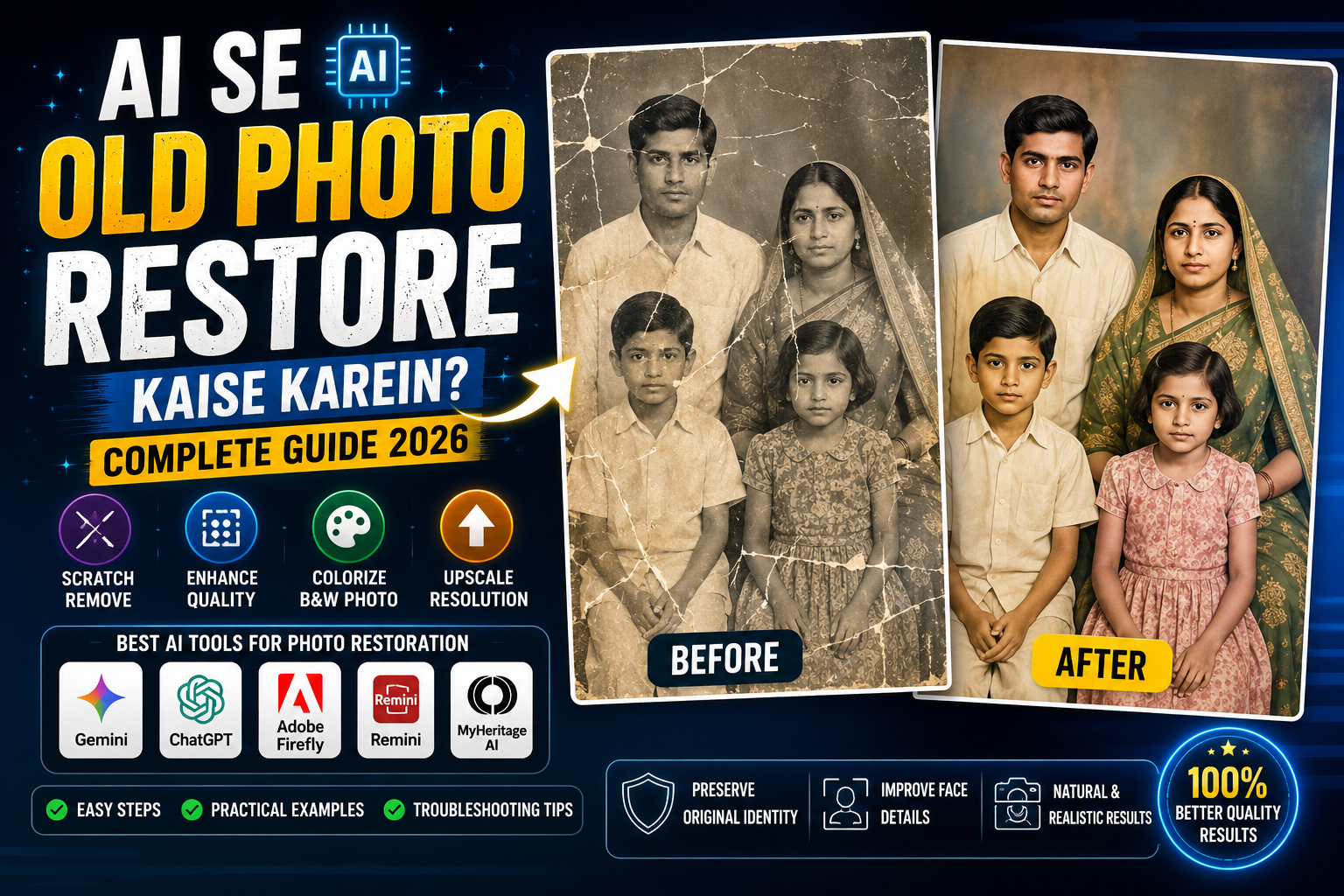
Purani photos sirf images nahi hoti, unke saath memories judi hoti hain. Lekin time ke saath old photographs fade ho sakti hain, scratches aa sakte hain, colors disappear ho sakte hain aur face details blurry ho sakti hain.
Aaj ke time mein AI photo restoration tools ki help se old photos ko digitally improve karna kaafi easy ho gaya hai. AI old image ko analyze karke scratches reduce kar sakta hai, contrast improve kar sakta hai, colors restore kar sakta hai aur low-quality faces ko sharper banane ki koshish kar sakta hai.
Is guide mein hum dekhenge ki AI se old photo restore kaise karein, kaunse AI tools use kiye ja sakte hain, black-and-white photo ko color kaise karein, blurry face ko improve kaise karein aur realistic result ke liye kya instructions deni chahiye.
AI Photo Restoration Kya Hai?
AI photo restoration ek process hai jisme artificial intelligence purani ya damaged image ko analyze karke uski visual quality improve karta hai.
Normal editing mein aapko manually:
- Brightness adjust karni hoti hai
- Contrast fix karna hota hai
- Scratches remove karne hote hain
- Colors adjust karne hote hain
- Sharpness improve karni hoti hai
AI-assisted restoration mein inmein se kai tasks automatically ya prompt-based instructions ke through kiye ja sakte hain.
AI restoration ka use especially in photos ke liye useful ho sakta hai:
- Old family photos
- Black-and-white photographs
- Faded photographs
- Scratched photos
- Low-resolution pictures
- Old scanned images
- Damaged portraits
- Vintage photographs
Old Photo Restore Karne Ke Liye AI Kaise Choose Karein?
Har AI tool ka restoration workflow same nahi hota. Tool choose karte waqt dekhein ki usme aapki required editing available hai ya nahi.
Useful capabilities:
| Feature | Kyu Useful Hai? |
|---|---|
| Image Restoration | Old photo defects improve karne ke liye |
| Upscaling | Low-resolution image ko enlarge karne ke liye |
| Face Enhancement | Face details improve karne ke liye |
| Colorization | B&W photo ko color look dene ke liye |
| Scratch Removal | Old damage reduce karne ke liye |
| Noise Reduction | Grain aur digital noise kam karne ke liye |
| Background Preservation | Original photo ko natural rakhne ke liye |
Agar aap sirf old photo ko clean karna chahte hain, to unnecessary creative AI generation ki jagah restoration-focused workflow choose karna better hai.
AI Se Old Photo Restore Kaise Karein?
Old photo restoration ka basic process simple hai.
Step 1: Original Photo Scan Karein
Agar physical printed photograph hai, to uska high-quality scan ya clear photograph lein.
Koshish karein:
- Photo seedhi ho
- Lighting even ho
- Reflection na ho
- Image blur na ho
- Corners visible hon
Agar scanner available hai, to high-resolution scan generally better starting point hota hai.
Step 2: Original File Ki Copy Rakhein
Editing start karne se pehle original image ko safe rakhein.
Ek copy bana kar us par restoration karein.
Isse agar AI result pasand na aaye to original photograph safe rahegi.
Step 3: AI Tool Mein Photo Upload Karein
Apne selected AI image editor mein photo upload karein.
Agar tool prompt-based editing support karta hai, to restoration instructions clearly likhein.
Step 4: Restoration Prompt Add Karein
Ye general restoration prompt use kar sakte hain:
Restore my uploaded old photograph while preserving the original people, faces, facial structure, expressions, hairstyles, clothing, body proportions, composition, and overall identity.

Remove or reduce visible scratches, dust marks, stains, fading, discoloration, minor damage, film noise, and unwanted artifacts.

Improve overall clarity, contrast, exposure, and tonal balance while keeping the photograph historically authentic.

Preserve the original facial features and do not invent new facial details.

Keep natural skin texture and realistic facial proportions.

Do not modernize the clothing, hairstyle, background, architecture, or objects in the photograph.

Do not replace the original people or generate different faces.

Maintain the original composition and camera perspective.

Improve image quality carefully while keeping the restored photograph believable and natural.

The final result should look like a carefully restored version of the original photograph, not a newly generated image.
Face Preserve Karne Ke Liye Special Instruction
Old photos mein face restoration sabse sensitive part hota hai.
AI kabhi-kabhi damaged facial details ko guess karta hai. Is process mein face original person se different bhi ho sakta hai.
Isliye ye instruction add karein:
Preserve the original identity of every person in the photograph.

Do not redesign or replace any face.

Do not change facial structure, eye placement, nose shape, lips, jawline, face proportions, hairstyle, or natural expression.

If facial information is unclear, prioritize preserving the existing visible features rather than inventing a new face.

Keep the restoration faithful to the original photograph.
Ye instruction particularly family photographs ke restoration mein useful hai.
Scratched Old Photo Ko AI Se Repair Kaise Karein?
Agar photograph par scratches hain, to restoration prompt mein specifically scratches mention karein.
Carefully remove visible scratches, dust, stains, crease marks, small tears, and surface damage from the uploaded photograph.

Reconstruct damaged areas conservatively while preserving the original people, clothing, background, architecture, and objects.

Do not invent unnecessary details.

Keep the restored areas consistent with the surrounding photograph's texture, lighting, perspective, and historical appearance.
Important
Agar scratch kisi face ke upar se guzarta hai, AI ko missing information reconstruct karni padegi. Aise case mein result ko original photo ke saath compare karna zaroori hai.
Black and White Photo Ko Colorize Kaise Karein?
Purani black-and-white photos ko colorize karna AI ka popular use case hai.
Lekin colorization mein AI ko original colors ka exact information nahi milta. Isliye AI estimated colors create kar sakta hai.
Natural result ke liye:
Colorize the uploaded black-and-white photograph while preserving the original people, faces, clothing, architecture, background, composition, and historical appearance.

Use realistic and naturally muted colors.

Keep skin tones believable and consistent with the lighting.

Avoid overly saturated colors.

Preserve the original facial features and expressions.

Do not modernize clothing, buildings, hairstyles, vehicles, or other objects.

The colorized image should look like a carefully restored historical photograph rather than a modern digital photograph.
Faded Photo Ko Restore Karne Ka Prompt
Agar old photo ke colors bahut fade ho gaye hain:
Restore the faded colors of my uploaded photograph.

Recover natural contrast, brightness, tonal range, and color balance while preserving the original appearance.

Do not oversaturate the colors.

Keep skin tones natural and preserve the original clothing colors as closely as possible.

Remove the faded yellow or washed-out appearance without making the photograph look newly generated.

Preserve the original faces, people, objects, background, and composition.
Blurry Old Photo Ko Clear Kaise Karein?
Low-resolution old photos mein face details limited ho sakti hain.
AI enhancement se image sharper lag sakti hai, lekin ek important limitation hai:
AI missing information ko perfectly recover nahi kar sakta.
Kabhi-kabhi AI unclear details ko estimate karta hai.
Isliye prompt mein conservative enhancement request karein:
Improve the clarity and resolution of the uploaded photograph while preserving the original details.

Enhance facial and clothing details carefully without inventing new facial features.

Reduce blur and noise while maintaining natural texture.

Do not create artificial skin, unrealistic eyes, or newly generated facial structures.

Keep the result faithful to the original photograph.
Old Family Photo Restore Karne Ka Best Prompt
Family photos mein identity preservation sabse important hai.
Restore this old family photograph with maximum fidelity to the original image.

Preserve every person's identity, facial structure, facial expression, hairstyle, clothing, body proportions, and position in the photograph.

Remove scratches, dust, stains, fading, minor tears, and visible photographic damage.

Improve clarity, contrast, exposure, and overall tonal balance.

If colorization is applied, use realistic and historically appropriate colors.

Do not replace faces or generate new people.

Do not change the number of people in the photograph.

Do not change the background, architecture, furniture, clothing style, or important objects.

Keep the original composition and perspective.

The final image should look like a professionally restored version of the same historical family photograph.
AI Restoration Mein Original Identity Kyu Change Ho Sakti Hai?
Ye problem especially old portraits mein dekhne ko mil sakti hai.
Agar face:
- Bahut blurry hai
- Scratch se covered hai
- Extremely low resolution hai
- Half hidden hai
- Overexposed hai
- Underexposed hai
to AI ke paas original facial information limited hoti hai.
AI missing information ko estimate kar sakta hai.
Isi wajah se restored face better quality ka lag sakta hai, lekin exact original face nahi bhi ho sakta.
Isliye restoration ka goal hona chahiye:
Improve + Preserve
na ki:
Completely Recreate
AI Restoration vs Normal Photo Editing
| Feature | Normal Editing | AI Restoration |
|---|---|---|
| Brightness | Manual | AI-assisted |
| Contrast | Manual | AI-assisted |
| Scratches | Manual/automatic tools | AI-assisted |
| Face enhancement | Limited | Advanced |
| Colorization | Manual | AI-assisted |
| Old damage | Time-consuming | Faster |
| Identity preservation | User controlled | Needs checking |
| Creative restoration | Limited | More flexible |
Traditional editing mein user ko zyada manual control mil sakta hai, jabki AI restoration speed aur automation provide kar sakta hai.
AI Restoration Ke Baad Photo Ko Natural Kaise Rakhein?
Restored image ko over-process karna easy hai.
Agar image mein:
- Too much sharpness
- Plastic skin
- Excessive saturation
- Artificial eyes
- HDR effect
- Unrealistic colors
dikh rahe hain, to restoration natural nahi lagegi.
Prompt mein ye instruction add karein:
Keep the restoration subtle and photographic.

Do not use excessive sharpening, HDR, artificial clarity, beauty retouching, oversaturation, or digital effects.

Preserve natural photographic grain and authentic texture where appropriate.

The final image should retain the character and age of the original photograph.
Old Photo Restore Karne Ke Baad Kya Check Karein?
AI result ko save karne se pehle original aur restored image compare karein.
Face
Kya facial structure original ke close hai?
Eyes
Kya eyes unnecessarily change nahi hui?
Hair
Kya hairstyle original jaisa hai?
Clothes
Kya clothing ka design preserve hua?
Background
Kya original location aur objects same hain?
People
Kya kisi person ko accidentally remove ya add to nahi kiya?
Colors
Kya color natural lag rahe hain?
Details
Kya AI ne unnecessary details invent nahi ki?
Common AI Photo Restoration Problems
1. Face Different Ho Gaya
Problem
AI damaged face ko recreate karte waqt facial structure change kar deta hai.
Solution
Identity preservation instructions add karein aur conservative restoration request karein.
2. Skin Plastic Lag Rahi Hai
Problem
AI face enhancement ke time excessive smoothing kar sakta hai.
Solution
Natural skin texture aur original photographic grain preserve karne ko bolein.
3. Photo Over-Sharp Ho Gayi
Problem
AI clarity ko bahut aggressively increase kar deta hai.
Solution
Prompt mein subtle restoration aur avoid excessive sharpening add karein.
4. Colors Bahut Bright Ho Gaye
Problem
Colorized photo modern digital image jaisi lag sakti hai.
Solution
Muted, historically appropriate aur natural colors request karein.
5. Background Change Ho Gaya
Problem
AI restoration ke naam par background details bhi regenerate kar deta hai.
Solution
Clearly likhein:
Preserve the original background, architecture, furniture, objects, and composition.
6. Person Add Ya Remove Ho Gaya
Family photographs mein ye serious restoration error ho sakta hai.
Prompt mein:
Preserve the exact number of people in the original photograph. Do not add, remove, merge, or duplicate any person.
add karein.
Mobile Se Old Photo Restore Kaise Karein?
Aap mobile workflow bhi follow kar sakte hain.
Step 1
Old photo ko phone se clear scan ya photograph karein.
Step 2
Image ko crop karein, lekin important edges remove na karein.
Step 3
AI editing/restoration tool open karein.
Step 4
Photo upload karein.
Step 5
Restoration prompt paste karein.
Step 6
Result generate karein.
Step 7
Face aur important details compare karein.
Step 8
Agar koi specific problem hai, to correction prompt use karein.
Step 9
Final image ko high-quality format mein save karein.
AI Restoration Ke Liye Best Photo Quality
Agar aap physical photograph ko AI se restore kar rahe hain, to source quality improve karna bahut important hai.
Photo capture karte waqt:
- Natural light use karein
- Flash reflection avoid karein
- Camera ko photo ke parallel rakhein
- Photo ko flat surface par rakhein
- Shadows avoid karein
- Maximum available camera resolution use karein
Agar photograph glass ke andar hai, to reflection ke wajah se AI restoration difficult ho sakta hai.
AI Se Photo Restore Karne Ka Practical Workflow
Ek simple workflow ye ho sakta hai:
Original Photo → High-Quality Scan → AI Restoration → Face Check → Color Correction → Final Export
Agar photo bahut damaged hai, to ek hi prompt mein everything fix karne ke bajay stages mein kaam karna better ho sakta hai.
Stage 1
Damage removal.
Stage 2
Clarity improvement.
Stage 3
Face detail enhancement.
Stage 4
Color restoration.
Stage 5
Final quality check.
Is approach se unwanted changes identify karna easier ho jata hai.
Old Photo Restore Karne Ke Liye AI Prompt Template
Aap future projects ke liye ye template save kar sakte hain:
Restore my uploaded old photograph while preserving the original image as faithfully as possible.

Preserve all original people, faces, facial structures, expressions, hairstyles, clothing, body proportions, objects, architecture, background, composition, and perspective.

Remove or reduce scratches, dust, stains, fading, discoloration, crease marks, minor tears, noise, and photographic damage.

Improve clarity, contrast, exposure, and tonal balance carefully.

Preserve natural photographic texture and realistic details.

Do not replace or redesign any face.

Do not add or remove people.

Do not modernize the clothing, architecture, hairstyle, vehicles, or objects.

Do not invent unnecessary details.

Keep the original character and historical appearance of the photograph.

The final result should look like a professionally restored version of the original photograph, not a newly generated image.

Avoid plastic skin, artificial facial details, excessive sharpening, excessive HDR, oversaturation, unrealistic colors, cartoon effects, artificial backgrounds, duplicated people, distorted faces, and invented objects.
Frequently Asked Questions
Kya AI old photos ko restore kar sakta hai?
Haan, AI tools old photos ki scratches, fading, noise, low clarity aur other visible issues ko improve karne mein help kar sakte hain.
Kya AI black-and-white photo ko color kar sakta hai?
Haan. AI black-and-white photographs ko estimated realistic colors mein colorize kar sakta hai.
Kya AI old face ko exactly original bana sakta hai?
Agar original facial details clear hain to result better ho sakta hai. Lekin severely damaged ya extremely blurry face mein AI missing details ko estimate kar sakta hai, isliye exact identity ki guarantee nahi hoti.
Kya AI scratches remove kar sakta hai?
Haan, AI-assisted restoration visible scratches, dust, stains aur minor photographic damage ko reduce kar sakta hai.
Old photo restore karne ke liye high-resolution image zaroori hai?
High-quality source image generally better results provide karti hai. Physical photo ko achhi lighting mein high-resolution scan ya photograph karna helpful hai.
Kya AI restored photo ko print kar sakte hain?
Haan, agar final image sufficient resolution mein export hui hai to printing ke liye use ki ja sakti hai. Large prints ke liye final resolution zaroor check karein.
AI photo restoration mein face change kyun hota hai?
Jab original facial information unclear hoti hai, AI missing details ko estimate kar sakta hai. Strong identity-preservation instructions is problem ko reduce karne mein help kar sakti hain.
Kya old photo ko restore karte waqt colorization zaroori hai?
Nahi. Agar original black-and-white photo ka historical look preserve karna hai, to colorization ki zarurat nahi hai. Black-and-white restoration bhi natural aur authentic ho sakti hai.
Kya AI damaged photo ke missing parts ko restore kar sakta hai?
AI missing areas ko reconstruct karne ki koshish kar sakta hai, lekin reconstructed details original information ka exact record nahi hoti. Important historical photos mein original aur restored versions dono preserve karna better hai.
Final Thoughts
AI photo restoration purani photographs ko digitally improve karne ka useful method hai. Faded colors, scratches, dust, noise aur low clarity jaise problems ko AI-assisted tools ki help se improve kiya ja sakta hai.
Lekin realistic restoration ka sabse important rule identity aur original details ko preserve karna hai.
Agar aap family photo restore kar rahe hain, to sirf image ko sharp aur colorful banana goal nahi hona chahiye. Original faces, expressions, clothing, background aur photograph ka character bhi preserve hona chahiye.
Best results ke liye:
High-Quality Original + Conservative Restoration + Strong Identity Instructions + Natural Colors + Final Manual Checking
ka workflow follow karein.
Aur agar photo bahut purani ya damaged hai, to AI result ko original photograph ke saath compare zaroor karein. Isse aap easily identify kar sakte hain ki AI ne sirf restoration ki hai ya kisi detail ko unnecessarily recreate bhi kiya hai.