You may have seen AI tools that promise to turn a small, blurry photograph into a sharp high-resolution image with just one click.
Sometimes the result is genuinely impressive.
A low-resolution image can come out looking cleaner, sharper and much more detailed than the original. Hair may appear more defined, faces can become easier to see, and edges can look considerably cleaner.
But there is an important question that often gets overlooked:
Did the AI actually recover the missing detail, or did it create a believable version of detail that wasn’t there?
The answer is usually more complicated than “AI makes photos HD.”
Understanding that difference is important if you use AI for photographs, social media, websites, product images or old pictures.
What Is Image Upscaling?
Image upscaling means increasing the dimensions of an image.
For example, imagine an image that is:
800 × 600 pixels
You could increase it to:
1600 × 1200 pixels
The new image has four times as many pixels.
But there is an obvious problem.
The original image didn’t contain those additional pixels.
Something has to determine what values those new pixels should have.
That’s where different upscaling methods come in.
Normal Resizing vs AI Upscaling
Traditional image resizing uses mathematical methods to estimate what the additional pixels should look like.
It doesn’t try to understand the photograph in a sophisticated way.
AI upscaling takes a different approach.
An AI model can use patterns learned from images to estimate what details might plausibly belong in the enlarged image.
For example, if it sees an area that looks like hair, it may generate a more detailed-looking hair texture.
If it sees a face, it may create sharper-looking facial features.
If it sees fabric, it may estimate a pattern or texture.
The result can look much better.
But this is where an important distinction begins.
AI Can Generate Detail Without Recovering the Original Detail
Suppose you have a very small photograph of a person.
The person’s eyes are only a few pixels wide.
There isn’t enough information in those pixels to determine every exact detail of the original eye.
An AI model can still produce an enlarged eye that looks realistic.
But the newly generated eyelashes, iris texture or skin detail may be an inference, not recovered information.
In simple terms:
AI can make an image look more detailed without knowing exactly what the original detail was.
That’s one of the most important things to understand about AI upscaling.
Think of It as an Intelligent Estimate
Imagine someone gives you a blurry photograph of a house.
You can clearly see that there’s a window.
But you can’t read the tiny number written beside the window.
If someone asks you to enlarge the photograph, you can make the window bigger.
But you can’t honestly claim that you’ve recovered the exact number.
An AI system faces a similar problem.
It can estimate what a missing pattern might look like.
But estimation isn’t the same thing as recovery.
Why AI Upscaling Can Look Surprisingly Good
If AI is inventing some details, why can the results look so convincing?
Because the model has learned visual patterns from many images.
It knows what certain things commonly look like.
For example, hair tends to have:
- Strands
- Direction
- Highlights
- Shadows
- Repeated texture
Skin tends to have:
- Fine texture
- Pores
- Small variations
- Shadows
- Highlights
Fabric tends to have:
- Folds
- Threads
- Repeating patterns
The AI can use these learned patterns to create a plausible high-resolution appearance.
The output doesn’t need to reproduce the exact original pixels to look convincing.
More Resolution Doesn’t Mean More Original Information
This is a common misunderstanding.
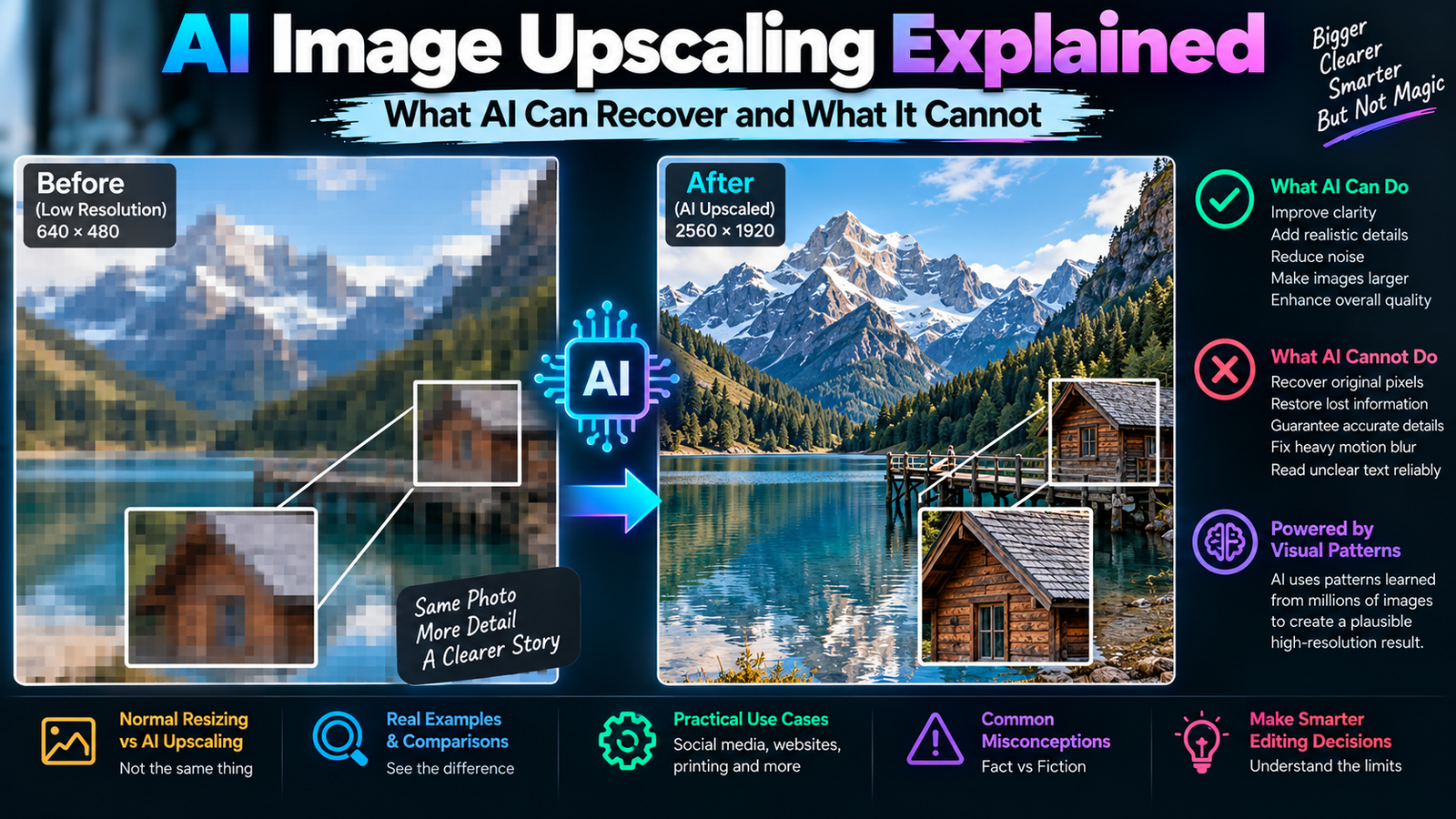
Suppose your original photograph is:
640 × 480
and an AI turns it into:
2560 × 1920
The second image contains many more pixels.
But those additional pixels don’t necessarily contain information that was originally captured by the camera.
Some of them are generated or estimated.
So don’t think of upscaling as:
“The AI found the missing pixels.”
A better way to think about it is:
“The AI created a higher-resolution representation based on the information available.”
That distinction becomes extremely important for faces, text and historical photographs.
What Happens When You Upscale a Face?
Faces are one of the most interesting cases.
AI models have seen enormous numbers of human faces during training.
Because of this, they can often reconstruct a visually convincing face from limited information.
A blurry face may become:
- Sharper
- More defined
- Easier to recognize
- More visually balanced
But there is a potential problem.
The AI may change subtle characteristics.
For example:
- Eye shape
- Nose shape
- Lip shape
- Skin texture
- Facial proportions
The output can look more attractive or realistic while being slightly different from the original person.
That’s why facial enhancement should be treated as an editing process rather than a guaranteed recovery of the original face.
Why This Matters for Old Photographs
Suppose you have a very old family photograph.
The original image is small and damaged.
You use AI to increase its resolution.
The result looks fantastic.
But some of the newly visible details may have been generated by the model.
That doesn’t make the result useless.
It simply means you should understand what you’re looking at.
If you’re restoring a photograph for personal viewing, a visually pleasing reconstruction may be completely acceptable.
If you’re trying to preserve historical evidence, you need to be much more cautious.
A generated detail should not automatically be presented as something that was definitely present in the original photograph.
AI Upscaling Can Improve Blur, But It Has Limits
People sometimes assume that AI can completely reverse blur.
That’s not how it works.
If a photograph is slightly soft because of lens quality or resizing, AI may improve its appearance significantly.
But if the original photograph is heavily motion-blurred, the actual information may be severely mixed together.
For example, imagine a moving person’s face appearing as a smear.
The AI can estimate what a face might look like.
It cannot guarantee that the reconstructed face matches the exact original appearance.
This is why AI enhancement and true information recovery shouldn’t be treated as the same thing.
Motion Blur Is Especially Difficult
Motion blur happens when something moves while the camera is capturing the image.
The resulting pixels can contain information from several positions.
Imagine someone moving their hand quickly.
Instead of recording a sharp hand in one position, the camera may capture a streak.
The original position has become ambiguous.
AI can attempt to reconstruct a sharper hand.
But it has to make a prediction.
This is one reason fixing motion blur in photos with AI can produce impressive results while still requiring careful review.
What About Out-of-Focus Photos?
Out-of-focus blur is different from motion blur.
With focus problems, details may never have been captured sharply in the first place.
AI can improve the visual appearance by estimating edges and textures.
But again, the model isn’t necessarily recovering the exact original detail.
If the photograph is only slightly out of focus, the improvement can be very useful.
If the photograph is extremely blurry, the AI has more room to guess.
AI Upscaling and JPEG Compression
File compression adds another complication.
JPEG uses lossy compression.
When an image is heavily compressed, some fine visual information can be discarded.
You may notice:
- Blocky areas
- Smudged textures
- Ringing around edges
- Loss of tiny details
If you then ask AI to upscale the image, the model has to work with those imperfections.
It may reconstruct a cleaner-looking texture, but again, the newly generated texture isn’t necessarily the original.
That’s why starting with the highest-quality source available is usually better.
Don’t Upscale a Screenshot If You Have the Original
This sounds obvious, but it happens constantly.
Someone takes a screenshot of a photograph.
The screenshot gets compressed.
Then it gets uploaded to social media.
Someone downloads it again.
Then they ask AI to upscale it.
By that point, multiple stages of processing may have already reduced the original quality.
If you have access to the original photograph, use that instead.
AI works best when you give it the best source information available.
What Does 2× Upscaling Actually Mean?
If an image is 1000 × 1000 pixels, a 2× enlargement generally means producing an image around:
2000 × 2000 pixels
That’s twice the width and twice the height.
Because both dimensions increase, the total number of pixels becomes roughly four times larger.
A 4× enlargement would increase each dimension four times.
So:
1000 × 1000 → 4000 × 4000
That is sixteen times as many pixels.
But don’t confuse pixel count with recovered information.
The output is larger.
That doesn’t mean sixteen times as much original photographic information suddenly exists.
Bigger Isn’t Always Better
It’s tempting to choose the highest available upscale factor.
But an extreme enlargement can sometimes produce an image that looks overly processed.
You may see:
- Artificial textures
- Strange skin detail
- Excessive sharpening
- Repeated patterns
- Unrealistic hair
- Halos around edges
If a 2× result looks natural and a 4× result looks artificial, the 2× result is the better image.
The goal isn’t to create the biggest file.
The goal is to create the most useful result.
Why AI Sometimes Creates “Too Much Detail”
AI models have learned that realistic photographs contain texture.
When an image is blurry, the model may attempt to add texture to make the result appear more detailed.
This can be helpful.
But sometimes it goes too far.
Skin may become unusually textured.
Hair can develop repetitive strands.
Clothing may gain patterns that weren’t originally present.
Walls can develop strange artificial surfaces.
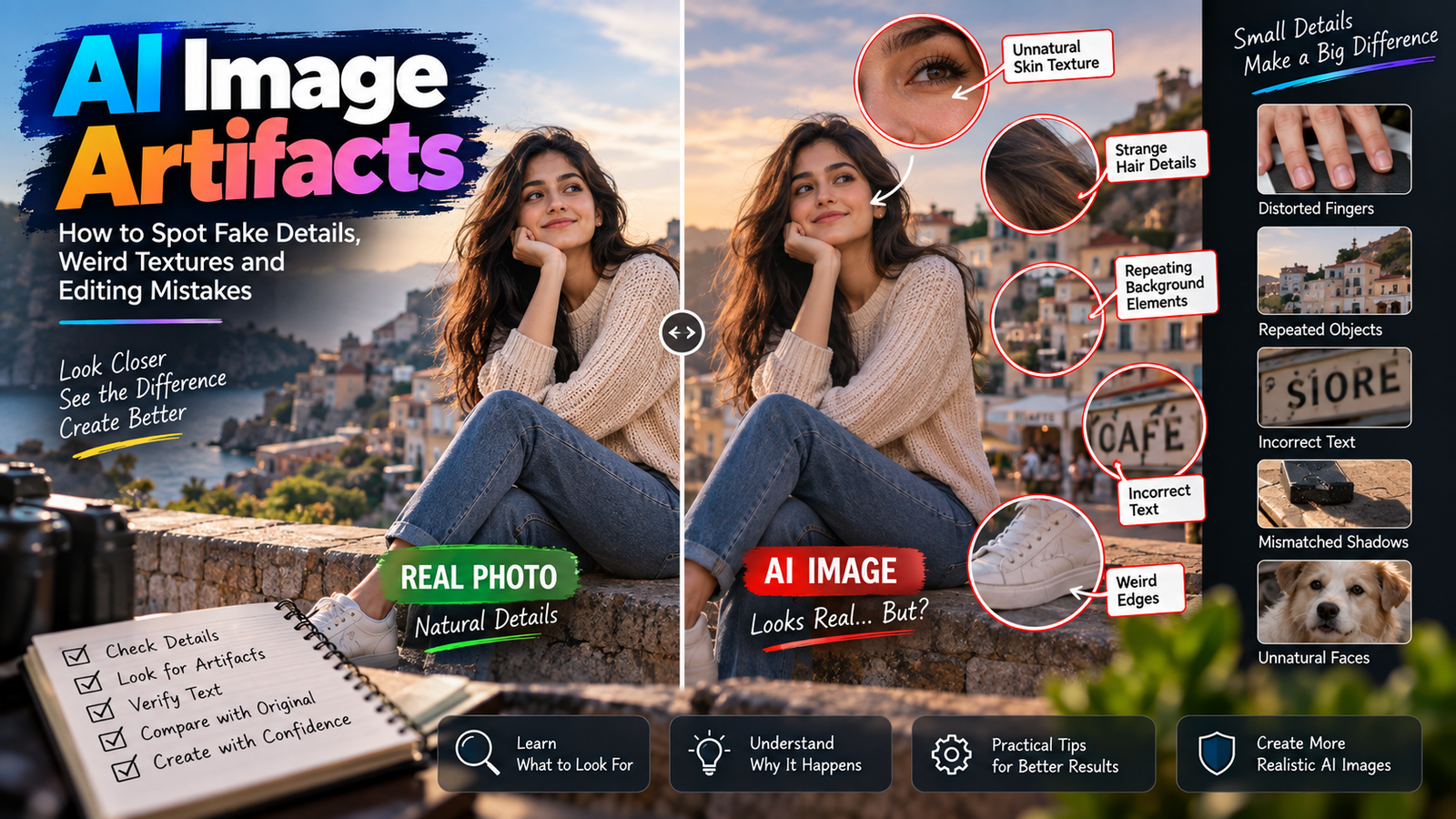
This is one reason you should compare the result with the original instead of judging the enlarged image by itself.
The Original Image Is Your Reference
When reviewing an AI-upscaled photograph, don’t only ask:
“Does this look sharper?”
Also ask:
“Does this still look like the original photograph?”
That’s a much better test.
Check important areas such as:
- Face
- Eyes
- Hands
- Clothing
- Logos
- Product details
- Text
- Background structures
If the image looks sharper but important features have changed, you need to decide whether that trade-off is acceptable.
AI Upscaling for Social Media
Social media platforms generally display images at much smaller sizes than the original high-resolution file.
That means you don’t always need an enormous AI-upscaled image.
A modest enhancement may be enough to produce a clean upload.
For social media, focus on:
- Correct dimensions
- Good sharpness
- Natural skin
- Clean colors
- Appropriate compression
- No visible AI artifacts
If the image looks good at the size your audience will actually see, generating a gigantic file may provide little practical benefit.
AI Upscaling for Websites
Website images introduce another consideration:
File size.
A huge image can take longer to load.
You may have an AI-upscaled photograph that looks beautiful at full resolution but is unnecessarily large for a blog page.
In that situation, resize the image to the dimensions actually required by the website.
Then optimize the final file.
Our guide on JPEG vs PNG vs WebP explains how different image formats affect quality, transparency and file size.
The best workflow is not:
Upscale as much as possible → upload the giant file.
It’s:
Create enough resolution for the intended use → optimize the final image.
AI Upscaling for Printing
Printing is different from social media.
A printed photograph needs enough resolution for its physical dimensions and viewing distance.
For example, a small image printed as a wallet-sized photograph has different requirements from a large poster.
AI upscaling can be useful when the original photograph doesn’t have enough resolution for the intended print.
But again, don’t assume that increasing the pixel dimensions guarantees professional print quality.
The source quality still matters.
If the original image is heavily damaged or blurry, AI may create a visually improved approximation rather than recover every original detail.
Product Images Need Extra Caution
AI upscaling can be useful for product photographs, especially when you need cleaner edges or a larger image for a website.
But products often contain information that must remain accurate.
For example:
- Logos
- Model numbers
- Labels
- Buttons
- Ports
- Packaging text
- Product proportions
If AI changes these details, the result may look better while becoming less accurate.
For commercial product photography, inspect important details carefully after upscaling.
A sharper incorrect logo is still an incorrect logo.
Why Small Text Is a Problem
Imagine a product label that is barely readable in the original photograph.
AI may produce letters that look clearer after upscaling.
But if the original pixels don’t contain enough information to determine the exact characters, the model may guess.
The result could look like real text while being completely wrong.
So if the exact wording matters, don’t use AI upscaling as proof of what the original text said.
Use a higher-quality original image or another reliable source whenever accuracy matters.
AI Upscaling Isn’t the Same as Sharpening
These terms are often mixed together.
Sharpening enhances existing edges.
It can make an image appear crisper.
Upscaling increases the image dimensions.
AI upscaling can also include enhancement and reconstruction, depending on the tool.
So an AI upscaler may do more than simply enlarge the image.
It can attempt to create a more detailed-looking version.
That’s why its output can look dramatically different from simple resizing.
Why Excessive Sharpening Can Make Photos Look Artificial
Even without AI, sharpening can be overdone.
You may see:
- Bright outlines around objects
- Harsh hair edges
- Increased noise
- Rough skin
- Unnatural contrast
AI upscalers sometimes combine enlargement with enhancement.
If the result looks too crisp compared with the original photograph, reduce the enhancement or choose a more conservative setting if the tool provides one.
Natural-looking detail is usually more convincing than maximum sharpness.
What AI Can Do Well
AI upscaling can be genuinely useful for:
- Moderately low-resolution photographs
- Slightly soft images
- Web images that need enlargement
- Small portraits
- Product images with sufficient original detail
- Social-media assets
- Improving visual clarity
- Preparing images for certain print sizes
The technology is particularly impressive when the original image contains enough information for the model to make reasonable predictions.
What AI Cannot Reliably Recover
Be careful when the source image is:
- Extremely tiny
- Heavily compressed
- Severely blurred
- Completely out of focus
- Missing important areas
- Covered by another object
- Damaged beyond recognition
In those situations, AI may still produce a beautiful image.
But beauty and accuracy aren’t the same thing.
The more information that’s missing, the more the AI has to infer.
The “Enhancement” Can Change the Person
Portrait enhancement deserves special attention.
Some AI tools don’t just increase resolution.
They may also improve or reconstruct facial features.
That can introduce subtle changes.
For a casual social-media image, you may not care.
For a personal photograph where preserving someone’s appearance is important, you should compare the before and after carefully.
Look particularly at:
- Eye spacing
- Nose shape
- Lips
- Jawline
- Facial expression
- Hairline
If the person no longer looks like themselves, the enhancement has gone too far.
A Better Upscaling Workflow
You don’t need a complicated process.
Start with the original
Use the highest-quality source available.
Inspect the image
Identify whether the problem is low resolution, blur, compression or something else.
Choose a reasonable upscale
Don’t automatically choose the maximum setting.
Review important details
Look closely at faces, hands, text, logos and edges.
Compare with the original
Make sure the AI hasn’t invented something important.
Resize for the final purpose
Don’t upload an enormous file if the website or platform doesn’t need it.
Keep the original
Always preserve the source image separately.
This gives you the option to try another workflow later.
Don’t Expect AI to Perform Digital Time Travel
This might sound like a joke, but it’s a useful way to remember the limitation.
If a camera never captured a detail, no software can know that detail with certainty simply by increasing the resolution.
AI can make an educated visual guess.
Sometimes that guess will be remarkably convincing.
Sometimes it will be wrong.
The technology is powerful because it can create plausible information.
The limitation is that plausibility isn’t proof.
How to Decide Whether an Upscaled Image Is Good Enough
Ask what the image is actually being used for.
For a social post
Does it look natural at normal viewing size?
For a website
Does it look good while remaining reasonably optimized?
For a product listing
Are all important product details accurate?
For a personal photograph
Does the person still look like the original?
For historical use
Have generated details been clearly distinguished from genuine original information?
The answer depends on the purpose.
There isn’t one universal standard for “good enough.”
A Useful Rule for AI Image Enhancement
When AI gives you more detail, don’t automatically assume it gave you more information.
It may have given you:
more pixels + better-looking visual patterns
rather than:
more original photographic information
That difference sounds small, but it changes how you should use the technology.
Final Thoughts
AI image upscaling is much more than simply making a photograph larger.
Traditional resizing estimates additional pixels mathematically, while AI upscaling can use learned visual patterns to produce a more detailed-looking image.
That can be extremely useful.
A small photograph can become cleaner, sharper and more usable. Slight blur can sometimes be reduced. Faces can become easier to see. Website and social-media images can benefit from improved clarity.
But there’s an important limit.
When the original photograph doesn’t contain enough information, AI may have to generate a plausible interpretation of the missing detail.
That means an AI-upscaled image can look more realistic without being a perfectly recovered version of the original.
For everyday creative work, that’s often completely fine.
For faces, products, text, historical photographs or anything where factual accuracy matters, you should be more careful.
The best approach is simple:
Start with the highest-quality original you can get, upscale only as much as you actually need, compare the result with the source, and remember that sharper doesn’t always mean more accurate.
That’s the difference between simply making an image bigger and actually understanding what AI upscaling is doing.